There is no box

thinking out loud about technology, education and life

  • Last year, I walked into the tail end of a network infrastructure upgrade. It was the standard fair for school districts in my part of the country. Cisco 3750X switch stacks everywhere. I always felt going with a full layer 3 enterprise class switch in building IDFs was a bit of overkill for schools. Really, only the MDF needs to be layer 3. In a simple (and elegant) school campus network design, the rest of the switches on campus only need to be layer 2. But, we were almost done with the upgrade and at that point there didn’t seem to be a reason to think too hard about what we were putting in or why.

    Fast forward to a few months ago and we started seriously looking at going 10Gb on the LAN backbone. The main reason was to keep pace with the aggregation of 1Gb wireless access points. We’ve installed 1 AP per classroom, which now have the potential to drive upwards of 6-10Gbs of backbone traffic per building. We started off with Cisco 4500X 10Gb core switches to support our 10Gb fiber WAN. With those in place, we considered installing 10Gb modules and GBICs in the existing 3750X stacks, however, we also realized that we wanted more port density and POE capacity in our IDFs. After taking all of these issues into account, we decided to take a step back and look at options.

    Around the same time, we were having issues with our existing wireless solution. As part of working towards a resolution to those issues, we initiated a trial of Meraki wireless access points and just happened to check the boxes for the switches too. I had familiarity with the Meraki UI and the amazing visibility Meraki access points provided into the wireless network from my last district. I was interested to see if we could get the same benefits on the wired network from their switches. So, we plugged a Meraki MS320 into the top of an existing IDF 3750X stack to find out.

    Immediately, we started to see the dashboard populating with client and traffic information from that school. Our Meraki support engineer had to tweak our settings to prevent VLAN interfaces from reporting aggregate client traffic, but after that, it was very powerful stuff for us. Having been basically blind to what was going on with the network before that, seeing the traffic flowing in real time was very impressive.

    Just to see what would happen, we briefly ran a Meraki switch between our district core switch and the hosted firewall at the county office. Lo and behold, we saw all our district traffic populating in the dashboard. Yes, we could see all that traffic in the Palo Alto Network firewall but really, the Meraki dashboard UI is so much faster and easier to use (although the latest update to the navigation menus is taking some of us a bit to get used to). After our testing, we made the decision to go with Meraki for our 10Gb LAN upgrade (and wireless too, but that is another story).

    It’s not all perfect. We’re going to have to give up EIGRP in favor of static routes, but really, we don’t have that many routes to contend with. We have a class B for each school site. Also, Merkai doesn’t have a 10Gb capable layer 2 switch, so we’ve had to go layer 3 for the IDFs. And because the MS320 won’t stack with the 3750X, we’re doing old school patch cables into the existing stacks. With the majority of our traffic being wireless and all of the wireless access points connecting directly to the Meraki switches, I’m not too worried about the 1Gb uplink capacity to the existing stack. Printers and AppleTVs are the primary users on the wired network and we can always add another uplink port if need be.

    “Real” Network Admins give Meraki a hard time for their simple UI and lack of direct console access. I on the other hand welcome it. In the old days, you had to be a magician (aka, trained network admin) to work magic at the command line. Over the years, more and more tasks have been made accessible through graphical user interfaces (GUIs). In my opinion, Meraki has perfected the network admin GUI. In a world of limited staff and jack-of-all trade skill sets with exponential demands for technology, simple and effective is a good thing.

    I’ve often argued that the majority of school networks should not require a complex understanding of network topology, esoteric routing protocols or advanced sub-netting. A simple Star topology with a few key subnets and you should be good to go. Would I recommend this strategy for LAUSD or SFUSD? Probably not. But for a district our size, with 10 sites, it makes perfect sense.

    We’re on our way with our top of stack 10Gb Meraki LAN upgrade. What’s your 10Gb LAN strategy?


  • Rain

    I was reminded what rain is this week at ISTE. Visiting Pennsylvania from drought stricken California, I had forgotten that rain can go horizontal. Even when it rains in California, it generally doesn’t defy gravity to whip underneath umbrellas like it did here in Philadelphia this week. In driving to and from the airport, I was also reminded that droughts are regional. There is an abundance of water, it’s just not evenly distributed!

    2015-06-26 12.51.14

    Speaking of evenly distributed, Philadelphia is the birthplace of our nation and as such it is steeped in rich history that I’ve had the good fortune to visit during conference downtime this week. Historical sites like Old Town are also not evenly distributed. As I was walking through Independence Hall contemplating the formation of the United States in a stuffy, hot, impossibly small room for the birthing of a nation, I wondered how many Americans will every get to see this place? I mean, it’s kind of historically important, right? I bet school kids in Philly get to visit it. Which got me thinking, how cool would it be for students around the US to connect with students in Philadelphia to discuss the founding our our Nation? Technology makes this kind of connecting stupid easy. Flat Connections, Global Read Aloud, One World Classroom and Skype in the Classroom are communities built around connecting classrooms to one another. Connections should be woven into as many curriculum maps, projects and learning outcomes as possible. It is 2015. No more pictures of the Liberty Bell in a book. Live Skype with a class or a park ranger at the Liberty Bell!

    Liberty Bell

    Enter PORTS, ubiquitous bandwidth and Virtual Reality.

    In California we have a virtual field-trip program run by the state parks called PORTS. I know there are other organizations doing similar things across the world. Several classrooms in my district have experienced these virtual field trips. Requiring only an iPad or laptop with a video camera, decent bandwidth and a teacher willing to give it a go, the technical barrier to entry for this is effectively zero. Usually consisting of a live facilitator and a multimedia presentation, I see these types of “presentations” as very early days for this technology in education.

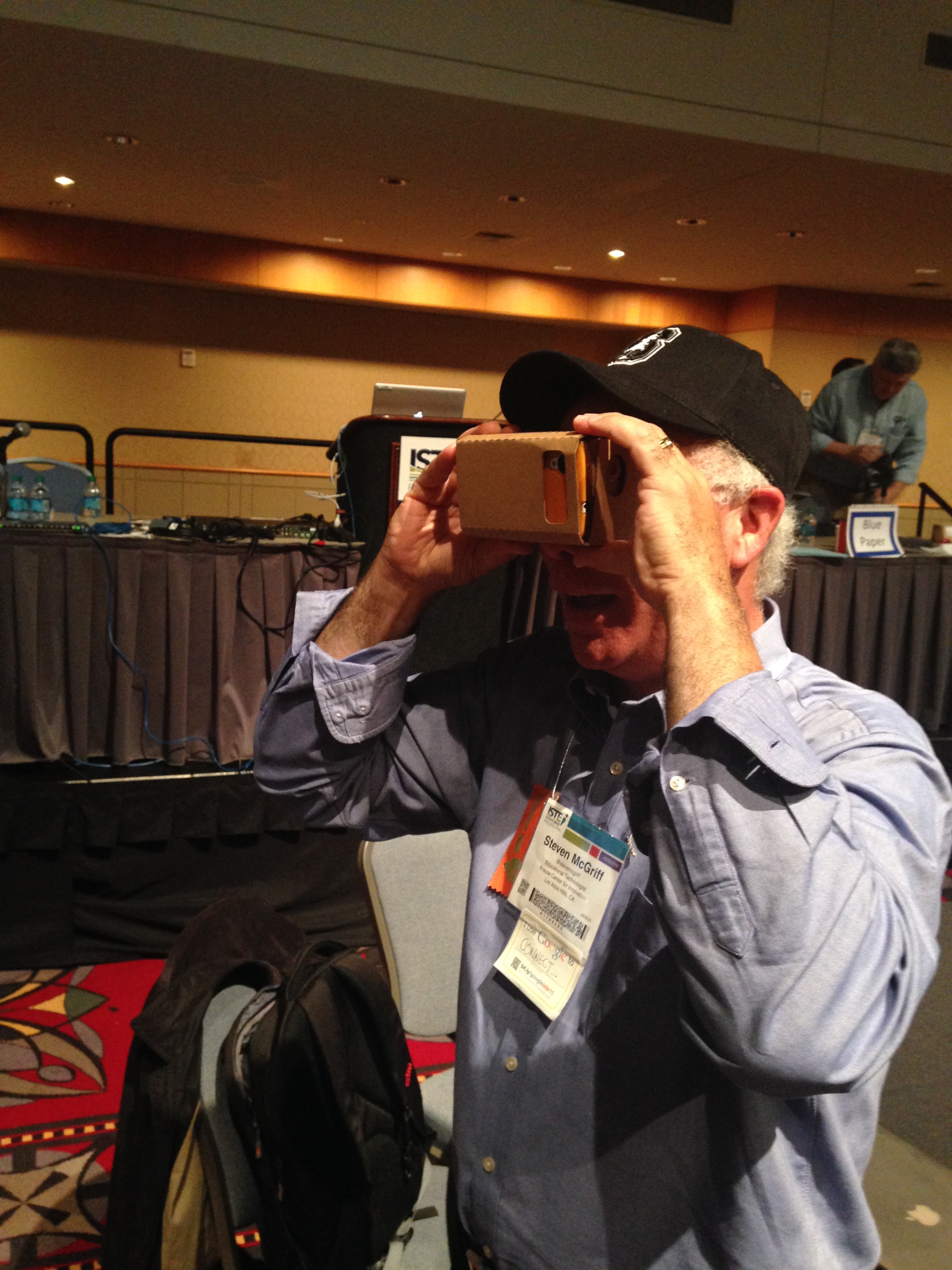
    With the ability to stream live video via LTE, experiencing the actual historical site doesn’t need to be dependent on a recorded video or a canned slide show. Visits can be live, dynamic and interactive. Additionally, Virtual Reality like Google Cardboard, which was on the exhibit floor at ISTE this week, can be added to extend the learning experience either before, after or during a live video stream. Telepresence is an untapped technology for Museums and historical sites to connect classrooms to their experiences. With something like Double Robotics, organizations could offer virtual tours of existing physical spaces, without having to program unique “online” experiences. In other words, the Liberty Bell could be accessible to any classroom today if we wanted it to be.

    Google Cardboard

    Technology is changing our world. We can choose to actively shape that change or we can let the change shape us. Embracing technology in education is an imperative, not for technology’s sake but for the sake of learning. We learn through experiences, technology can connect us to those experiences.

    Now, to get a PO for Double Robotics and Google Cardboard through the purchasing process…

  • The Missing Literacies – Networking to Learn

    Kids sitting in rows of desk. Silent classrooms. Individual worksheets. This is not how we learn in the real world. It was my experience in school, as it still is for many. But I went to school BT (Before Twitter) and BGHO (Before Google Hangouts). The extent of networking to learn, if we were lucky, was putting four desks together and working in groups. And if you asked a peer a question during a test or worked on a homework problem in a group and came back with the same answer, watch out!

    In college, some of my best learning experiences were working on group projects. We also used study groups to self organize around a specific course, topic or test. Both those group learning experiences were constrained by proximity and time. Enter Twitter and the rise of social media. Have you checked out an #caedchat lately?

    Networking tools like twitter and Google Hangouts (GHO) now allow the formation of groups of peers and experts to assemble around themes, topics and interests. These groups (or Personal Learning Networks) allow for just in time information requests, asynchronous collaboration and archived knowledge bases. If Google is the card catalog for the world’s information, then twitter and GHO are the university hallways and the study halls that make global personal learning networks possible.

    The world has changed. If we do not teach children how to build online networks to access learning resources, then we are failing to empower them as learners. If we don’t embrace technology to build personal networks of our own for learning, then we risk being left behind in a world of ubiquitous access to information and just in time learning.

    Why then do we not move into an era of learning to network and networking to learn? Why do we not teach building personal learning networks as a fundamental literacy of learning?

  • The Missing Literacies – Learning to Search

    Back in the day it was reading, righting and rythmatic. Thinking about it, being able to read well to make the transition from learning to read to reading to learn made sense when content was primarily accessed in a structured and sequenced finite resource, aka the textbook. Being able to use a table of contents and an index were a critical part of the content access experience.

    How times have changed. When was the last time you used an index to look up something in a book? I can’t remember. The last time I looked up something, I used Google. My reading now is primarily done online, as is my research, but I remember long ago, the initial trip to the school library where we all sat through the lesson on using the card catalog. In college, I remember dreading having to use the much larger and more intimidating University library to lookup and find information for my class reports. Must have three references!

    I had what was probably a fairly typical experience of learning information access and retrieval during my formal education. That world no longer exists except in our schools. The University library is no longer the pinnacle of information repository. The ancient Library of Alexandria has been reborn in the Web. Information is now ubiquitous, dependent only on access from a sub $200 device and wifi. Google has become the card catalog to the world’s global library.

    Why then do we not move into an era of learning to search and searching to learn? Why do we not teach search as a fundamental literacy of learning?

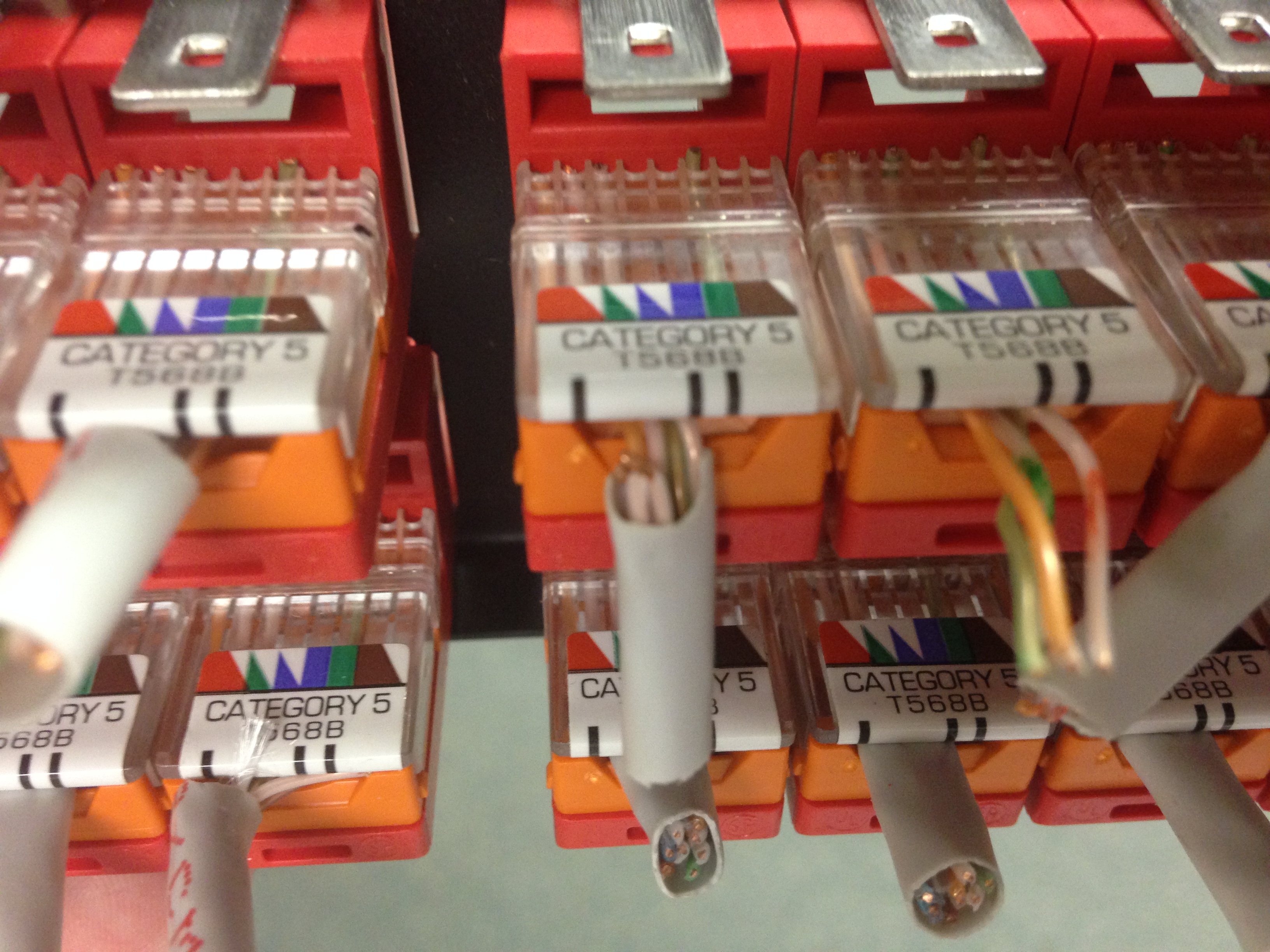
  • 4 Pair or only 2?2-Pair Cat5

    The above picture came from a recent visit to an undisclosed school district. What you are looking at are perfectly good Cat5 Cables and RJ-45 jacks where 2 pair of wires were cut back at the patch panel and the remaining 2 pair of wires were terminated in the jacks. Why would anyone do such a thing, you ask? Apparently because the installer couldn’t imagine a world where anyone would ever need to use more than 2 pairs or go faster than 100Mbps. I guess Gigabit and PoE were just inklings of someone’s imagination when these cables were installed but still, I’m thinking it would have taken just as much time to terminate the extra 2 pair than to carefully cut them back from the end of the cables.

    Upon trying to run Gigabit and PoE over the existing cables, the district’s newly hired IT guy discovered the problem and has had to go back, cut the cables from the patch panels and re-terminate them properly using all four pairs. For both sides of each cable run. Makes me want to go check all my patch panels. Immediately.

    There is something to be said for thinking ahead. Just because we don’t see a use for something now, doesn’t mean down the road it won’t come in handy for some unforeseen purpose. I’m thinking about that second Cat6a cable we’re running to every classroom. Who knows when 10Gb to the classroom will be needed.

    I’ll put this one in the “hope to never run into this in my district” category.


  • In my teacher life, I spent a considerable amount of time out of the classroom. Well, classrooms, actually. I didn’t have my own classroom. I shared two classrooms with two other teachers. But it wasn’t all sad face, I did have a closet of an office for when I was wearing my IT hat. Got to love the small school districts.

    I was out of the classroom at least once a month for County Office edtech meetings. I also attended CUE and CETPA conferences as well as had to put out the odd IT fire during class time every once in a while. All in all, I’d say I averaged around 20 days a year out of the classroom (including sick days and Jury duty). Now, this was high school, I had the luxury of being in computer labs for all my classes so I taught 100% blended online with very little paper. Often I would be online checking in on my students even if I was out sick or at a conference. Thanks to Moodle and Google Docs for that.

    While a part of me missed being at school (and not because I didn’t want to make lesson plans for subs, I didn’t need to with Moodle!), getting out allowed me the opportunity to connect with other educators, be inspired by innovative schools and grow as a professional. All of my out of classroom experiences helped to make me a better teacher in the classroom when I got back. My experiences out of the classroom are probably why I’m such a big believer in getting teachers, administrators and my tech staff out to conferences and visiting other districts and classrooms now.

    A Balancing Act

    Lately I’ve been reflecting on the question of how much time out of the classroom is too much. The topic has come up a few times in discussions. I’m in a position now where developing a high quality continuous professional development program is becoming a balancing act between the need for teacher release days and a state wide sub shortage. Trying to minimize pulling large groups of teachers out on the same day while still being able to bring in outside presenters in an economical manner and allow time for teacher collaboration is getting harder and harder as the qualified sub pool shrinks. However, I strongly believe in giving teachers time to learn and collaborate. With Common Core and ubiquitous student mobile device access, we are asking teachers to transform their pedagogy, to explore and adapt to new possibilities for teaching and learning. That takes time and support and requires a balance between meeting the needs of students in the classroom today and preparing for the future needs of tomorrow’s students. We are literally rebuilding the airplane while flying at 30,000 feet. Exactly what the appropriate balance should be is still up for debate.

    Another scenario I’ve been thinking about is a core group of Technology Teacher Leaders, many of whom have expressed an interest in coaching part time, who could leave their classrooms for several days to work with teachers at their schools. The demand for edTech PD is there. The concept of coaching part time and maintaining the connection to the classroom is a compelling one. I’m several years out of the classroom now and even though I was fairy cutting edge in my day, I’ve definitely lost the connection to students that you get from working with them day in and day out. Nothing can replace the feedback from introducing technology into a classroom quite the way a room full of students and trial and error can. I do miss the interaction with kids.

    Regardless of the situation, the question remains, especially for elementary classrooms, how many days should a teacher be out of the classroom? At what point does a teacher’s absence jeopardize the learning experience for students? How many days is too many probably is more dependent on the teacher and the students than we’d like to think. Class dynamics change from year to year and some teachers are better able to prepare their classes to function without them than others. At some point, there has to be a diminishing return. What that point is and how to measure it, I’d love to hear people’s thoughts and ideas.


  • CUE15UnconWHITE

    This year, CUE brought back the unConference with #cueUnCon. I spent Friday morning of the conference over at the Hard Rock talking pedagogy, curriculum adoption and Google Apps. That was a big win for me personally because the CUE annual conference can sometimes feel overwhelming with all the tech tools. It was great to just sit down and have a conversation for a bit. Which begs the question, is there a place for an un-conference during a traditional conference? Attendance at the UnCon wasn’t great but every edcamp (another uncon) I’ve ever attended started small and built over time. Not helping cueUnCon was the location, being a bit of a hike away from the main venue and hidden behind a corner. Although this could also be a good thing. The unCon was also announced rather late, which may have further contributed to the sparse attendance. Being that it was held in one big room, it was probably a good thing to not have had a lot of people. Lack of breakout rooms to run different sessions in would have been problematic had a ton of people showed up.

    I love the edcamp model of unCon. To me, a free event, participant driven and organized with minimal sponsors present, makes for great discussion. The CUE unCon had great facilitators and I really enjoyed the time I spent over there. I’m hoping to see unCon return to CUE 2016, perhaps in a friendlier location with more advance notice. I’d really like to see CUE explore the idea of opening the unCon up to anyone, maybe on the Saturday, which was light on attendance anyway. Personally, I wouldn’t mind it being a full blown edCamp. Given time and proper stewardship, I think it could grow into a gem of an event within an event.

    Otherwise, their will always be the Renaissance Hotel #LobbyCon and a bazillion edCamps across California. In fact, there’s one this weekend (April 25) in San Jose.

  • Sign Builder

    I’ve been looking for an easy to use, free (or low cost) digital signage solution since forever. Back in the Le Grand days, Danny Silva hacked together AppleTVs and iTunes to create digital signage for our school. For the past several months, I’ve been playing with RiseVision and chromeboxes. I had it to the point of being able to display a RiseVision template but found trying to get the content into the template frustrating. Friday I did a search for “Chromebox digital signage” and found Google Sign Builder! Sign Builder is an App for Chrome devices that can display URLs and Youtube Videos and best of all, it’s all controlled through the Admin panel. There is a Schedule app that creates a txt file with the schedule and resources defined which is then uploaded through the admin panel and pushed to the chromeboxes that have the Sign app installed.

    It’s very slick and easy. I was able to get everything setup in less than a hour of fiddling and had a Google Sheet auto-looping in about 5 minutes. The hardest part of the whole thing was finding the Schedule Builder app, because it didn’t show up in the Chrome Web Store. Simon Miller (@LeadEdTech) got ahead of me by adding a YouTube video to his schedule and is now playing with the refresh. I’ll be experimenting with that on Monday.

    So far, it looks like this is the solution I’ve been looking for. A shared Google Sheet per site will allow users to easily update their own content. If we need to push a district notice, it’s as easy as updating the schedule for each Sub Org (assuming policy refresh works). I can’t wait to play some more on Monday.

    Here’s how I got started:

    Steps

    1. Setup a Device Sub Org and put your Chromebox into it. I called ours Kiosk. I plan to create a Kiosk Sub Org for each site. The schedule, and therefore the content displayed on the screen, is applied at the Sub Org level.
    2. Deploy Chrome Sign Builder as an Auto-Launch Kiosk app for your Kiosk Device Sub Org.
    3. Create and Publish a Google Sheet. I created a Kiosk User that I can use to create sheets with and then share out to each site/department.
    4. Build and Upload a Schedule. You’ll need this link to get the Scheduling App since it doesn’t show up in the Chrome Web Store yet.
    5. Reboot your Chromebox to force the policy to take effect (I was too impatient to wait on policy refresh)

    Chrome Sign Builder App

  • Warning, do not try this at home.

    I deleted my school’s Google Apps Domain for Education today but probably not for the reasons you might think. Ok, technically I cancelled the subscription which deletes all accounts and data, but same thing.

    You see, somewhere along the line, our GAFE domain got flipped to a Nonprofit for Work domain. We only found out because we hadn’t received our unlimited drive storage yet. Having waited patiently through the new year, we opened our second support ticket (the first time we were told to wait patiently) and were then informed that because we were not a GAFE domain, we weren’t eligible for free storage.

    After a double-take, I was informed that we were in fact listed as a Nonprofit for Work domain, which coincidentally enough also has Google Classrooms, and that to get unlimited storage, we would have to downgrade from Nonprofit for Work and then re-apply to be a GAFE domain again. And oh, by the way, all of our Google Classrooms would be reset. The same Google Classrooms that teachers have started using like wildfire. The same Google Classrooms that are used to deliver our District Wide Writing Assessments in 6-8th grades. Um, yeah, not going to happen. I asked for an escalation and immediately emailed Jaime Casap, Education Evangelist at Google. I waited about 20 seconds for a reply and then tweeted at him too. He got back to me within a few minutes and said he’d look into it.

    Fast forward to this morning and a call from a Google support engineer. Our issue had been escalated, they had a script that would downgrade our domain and upgrade it to GAFE while keeping our Classrooms intact, and all without causing any interruptions to active users. I asked about that last part several times, and each time was reassured this had been tried and verified many times.

    Nervous but willing to try, I agreed to run the script, figuring it was better for something to go wrong at the end of a minimum day with Google support on the phone than later in the day without one. So he emailed me the link to the script, I ran it and it prompted me to login to the clark county schools domain. Oops. Apparently they had the same problem too. New link, new attempt, this time it ran but didn’t get the expected result. It just gave me a click here to continue and took me back to the Admin panel. The support engineer, let’s call him Manny, had me open an incognito window and try from there. Nope. Then he had me check the domain’s super admin and change it to match my super admin username. I ran the script again. Nope. Manny politely asked to put me on hold for 2 minutes, my nerves ratcheted up because clearly the script that had worked several times wasn’t working for us and I was starting to second guess the whole thing when Manny came back on and requested a Google Hangout to share the screen. We did that, and then he had me login to gmail in the incognito window and launch the link to the script from there. Same result. Not what he was expecting. I could hear him typing away with what I could only assume was an engineer somewhere in the cloud. When he spoke again, he said we’d have to do it the manual way.

    Ok. We went into the Admin panel and he had me click on Nonprofit for Work and select Cancel. At this point a very scary screen came up and asked if I wanted to permanently delete the domain and all the accounts and data in it FOREVER, or if I just wanted to kind of delete them for 4 days, during which time I could cancel the deletion. At this point, Manny went, Hmmm and asked to put me on hold again. When he came back on, he told me to select the delete FOREVER option, I take my hand off the mouse and calmly asked him, “and we won’t lose any Google Classroom data OR gmail accounts OR drive data?”. To which he said, nope. So in the biggest leap of faith I have ever taken with support, I clicked delete.

    And the hangout dropped off and my gmail login kicked me out and my department sent out a collective, “What the???” And then the phones started ringing. At this point my heart probably stopped. As calmly as I could I said, did we just delete everyone’s account? Manny calmly replied, no, he could still see the data, and could I please hold for 3 minutes. Three minutes!!! He came back after what seemed like forever and ask me to quickly re-add Google Apps for Work in the Admin panel. Um, yeah. I refreshed and re-logged in to the Admin panel (at least that worked), after filling out the captcha (I was thinking, oh man, is everyone going to have to do that again?) and then clicked to add the service back to the domain. The page started to load and then threw up a 404 error. I almost panicked, but I refreshed the screen, re-added the service and after two tries of filling out the organization information, managed to get Google for Work enabled on the domain. During this time, no one could login to their Google Accounts and all they saw was this:

    Google Account Deleted

    Manny kept reassuring me that he could see all of our accounts and data, and could I just enable Work a little faster, but no pressure! Once I had Work enabled, he flipped it over to Google Apps for Education in less than a minute. We verified people could log in again (same passwords), that our data was still there and that things like email still worked. Then we checked out Classrooms and found everything intact. Yay. People didn’t have to enter captchas, mobile logins didn’t need to be reset and unlimited storage is now a reality. No data was lost in the process but my nerves sure took a beating. A few little things got dropped, like custom URLs for google services, but those were minor fixes.

    In hindsight, it was a risk deleting the domain, but I asked Manny several times if it would be ok, asked if he was sure that this was what we had to do and would our data and accounts be ok afterward, and each time he reassured me that yes, our data would be ok and I believed him. Because despite the initial script failure and the hiccups, at the end of the day I trust that Google has smart engineers who can solve hard problems and if the whole thing ended up blowing up, I had faith that they would fix it for us. Yes, at times, I felt like those Apollo 13 astronauts must have, radioing back to Mission Control for support and like them, we made it through.

    I used to trust Google with our core collaboration and messaging platform because I hoped that Google had the kind of enterprise engineering support that I could never afford to staff as a school district. After this experience, I know they do.


  • Mobile carts are a necessary evil in classroom 1:1 programs. I’d much prefer to send devices home with students to keeping them locked away when school is not officially in session. Be that as it may, we have a lot of carts. For our last round of chromebook carts, we went with the Aver TabChargeCT2. Feature wise it ticked all the boxes. Intelligent charging, capacity for 40 devices, rugged construction and a flat top for teachers to store stuff on. All in all, it’s a great cart. However, we’ve discovered an inconvenient flaw in the cable management design. Power cord management is always a challenge (my favorite cord management to date is found on the Anthro Yes carts). With the Aver, the pull out shelf makes it even more important. The Aver cart comes with little plastic clips meant to hold the cables along the upright spacers. The clips are two sided, one side being larger than the other. At first we were installing our power cords in the big side, not realizing that they were actually different sizes. After a few weeks out in classrooms, we started to see the result. Power cords coming loose all over the place. We went back and put all the cords in the smaller side, which was not easy. A few more weeks later and we were right back in Spaghetti central.

    The clip is a decent solution for Adults, but if you stop and watch how kids handle the in and out of devices in mobile carts, you quickly realize, a bomb proof cart is not good enough, it has to be Superman proof. Another reason I prefer sending the devices home with kids to storing them in classrooms.

    Aver ChargeTab2 after a few months in the classroom.
    Aver ChargeTab2 after a few months in the classroom.

    Instead of following my initial instinct, which was to go back through and zip tie the power cables to the uprights, I called Aver. They came out right away and took a look at what was happening. They’ve gone back to the drawing board for a fix and have committed to retrofitting our 100 carts. That’s the mark of a great company.

    We’re currently evaluating the TabChargeCT2’s little brother, the C30i, for use in our mixed device K-2 pilot. The C30i is a nice little cart, but it has the same power cord clip system as the TabChargeCT2. As soon as Aver get’s the spaghetti issue fixed, we’ll probably be ordering a few truck loads of the C30i.

    What’s your favorite mobile device cart and why? Have any power cord spaghetti pictures to share?