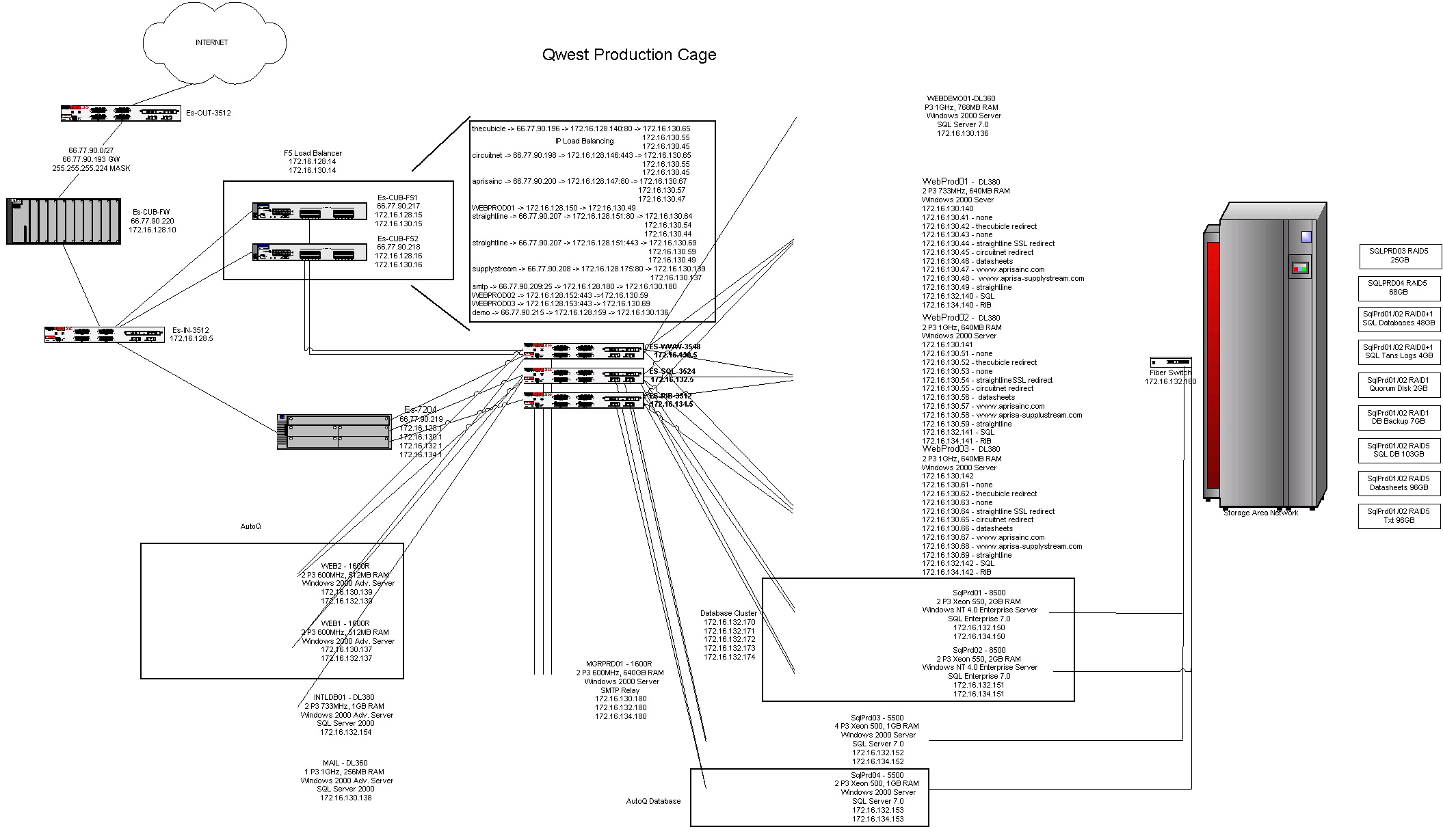
Found this today while I was doing some folder clean up. To think I used to be responsible for all this big iron, with a duplicate setup for development and staging too. These were the first SQL Clusters, SANs, Load Balancers and PIX firewalls of my very own. Oh, the good old days…
There is no box
thinking out loud about technology, education and life
recent posts
about
-
Have I said this before? Hangouts make hanging out so easy and the ability to record conversations for posterity is awesome! Mike Vollmert and I had a great rambling discussion about the elephant in the room – the need the change Professional Development to meet the changing instructional paradigms in a 1:1 world. We also talked about OS X or Ubermix. Now the challenge is getting someone to watch.
-

Why Ubermix? http://blog.ubermix.org/2013/01/why-ubermix.html In a recent post titled, In A Perfect EdTech World, I said I would give every teacher an ubermixed ultrabook. Now people that know me know that I took Le Grand Union High School District teachers from Windows Desktops to MacBook Pros a few years ago and I advocated for MacBooks for every teacher at East Side Union High School District during my brief stint there. At my current district we just handed out MacBooks to our Common Core Site Champions and I’m in the planning stages of replacing fixed virtual desktops with MacBooks for the rest. So what’s up with that?
I said in a perfect world I’d give every teacher an ubermixed ultrabook. Unfortunately we don’t live in a perfect world and reality often gets in the way. I actually experimented with providing Ubermix netbooks to teachers at Le Grand a year before we went MacBooks. The results were mixed with most folks using ubermix to remote in to their windows desktops using RDP. Letting go of Microsoft Office and their windows H drive seemed to be the biggest hurdle at the time. The reality with an ubermixed ultrabook is that it’s different. Very different in fact than what most people use every day. It’s even more different than a chromebook, because at least a chromebook’s UI is basically a web browser which almost everyone is familiar with. So even though an ubermix ultrabook is in many ways the ultimate in performance and cost effectiveness, it’s a hard transition. The ubermix UI, while simple to use, isn’t Windows and it isn’t OS X either. Kids pick it up quickly, but change for adults is often much harder. Years of muscle memory takes effort to overcome. I think people are finding that out with Windows 8, but that is another story. In short, ubermix for teachers is a hard sell with a steep learning curve.
Then what makes a MacBook and OS X my go to choice for teachers at the moment? Well, Apple makes the best hardware anywhere. Battery life is phenomenal and the other features like backlit keyboard, aluminum uni-body and mag-safe power adapter are wins in my book. There’s also the easy to use factor and the low exposure to malware and virus attacks (I said low, not none). I’m confident that I’ll get a solid four years out of the device. On the user side, I figure that giving a MacBook to a Mac user cuts down my support calls because Mac users tend to be pretty Mac savvy. Giving them a Windows 7 or 8 laptop turns them into a support call. With 42% of my teachers wanting a Mac, the support factor can’t be ignored. In addition, a MacBook can run windows. Either in a virtual box instance or under boot camp. A Mac will run multiple browsers with support for Java, Flash and even silverlight. And yes, it works with all those AppleTVs and iPads that are showing up in classrooms all over district’s everywhere not to mention iBooks Author and Configurator too (yep, teachers can manage their own iPad sets in their classrooms).
The hurdles to MacBooks are generally two fold. One is cost and the other is the Windows IT department. My answer to both is simple. Cost wise, when I break down the total cost of ownership which factors in lifetime support costs of the device, a MacBook at $1200 can perform on par with a Windows Laptop at $700 over the life of the device. That’s before looking at the feature comparisons mentioned above. But how is that possible? Well, again it goes to malware, virus and user support. And it also dovetails into the second hurdle which is IT. Contrary to popular best practice, I have no interest or intention of managing (ie. controlling) MacBooks. I hand them out with local admin access, not joined to a domain and give users control of their own computing experience. Any problems, we re-image back to baseline. It’s really that simple. We show users how to run updates, install applications, add printers and connect to network shares and they can take it from there. It’s the consumerization of IT and the empowering of the users (no, I did not watch Tron too many times as a kid, well, ok maybe I did).
But as easy to support and low attack profile as OS X is, ubermix is better. Nobody bothers with Linux. And with new Haswell based ultrabooks coming on line, I’m sure there will be some hardware that’s close enough to MacBook Pro performance to be good enough. Unfortunately, I think ubermix has to be a slow burn, not a rip and replace. It takes time to build momentum for that kind of radical change but once people experience the potential of ubermix to provide a universal no-cost, powerful computing experience for kids (and adults too), they finally get it.
Today, I see the MacBook running OS X as a versatile, cost efficient, jack of all trades platform for teachers, especially for environments invested in iPads. However, the more I think about it, the more I think there is no one size fits all teacher computer. Some may never need anything more than a Chromebook to take attendance, answer email and enter grades. Some may want all the content creation features and tight integration with iPads that OS X offers and some may even want Windows (although keeping them running while being open is always the challenge). Others may fall in love with ubermix right off the bat. The problem is, how do you determine which platform is right for which user when the user probably doesn’t even know the answer to that question themselves?
-
Sunday I got to hangout with Alice Keeler and talk all things google edtech. Well hangout the way edtech people do when we’re not at ISTE, CUE or an edCamp, virtually on Google Hangout. Here’s the episode. One of these days, I’ll post it to rebootedpodcast.com too.
-
Saw this on twitter today –
http://www.teachthought.com/learning/21st-century-learning-is-not-a-program/
“Many people tend to associate 21st century learning with digital technology. This is an incomplete perception because 21st century education goes beyond mere trinket tools of the trade. Rather, it is a way of thinking- a rationale about what educators do and why they do it.”And it got me thinking. Technology enables, but cannot by default create, 21st century learning environments. Unfortunately it is very hard to even begin to imagine what opportunities an authentic 21st Century technology rich integrated learning environment can provide teachers and students without first having access to technology.
Up until this moment, the technology wasn’t ready for the average classroom. People that tried one to one computing with clunky laptops that took 5 minutes to boot and died after 3 hours were the pioneers. They bravely crossed the frontier in their Apple IIc wagons but the whole endeavor was too expensive and cumbersome to bring the average classroom teacher along for the ride. It was the wild west of technology in classrooms and the majority of folks were quite happy to stay back east in their comfy cities, with their books and pencils and chalkboards.
Image Source: http://www.kued.org/uploads/photos/43-210_ogdentrackside-web.jpg
But now with “relatively inexpensive” bandwidth, low cost Internet enabled devices (ubermixed netbooks, iPads, Nexus tablets and chromebooks), a new set of standards that promise electronically accessible curriculum content and a generation of teachers coming online that grew up digital, the digital frontier is fading fast. Replaced by the new normal of ubiquitous access, information abundance and the social web. The roadblocks to providing students an education relevant to their time and the one we need them to have (so they can fix all the messes they’ll inherit from us) exist mainly in the mind now. The transcontinental railroad has been joined and passage west is ready for the masses. Time to get onboard and see the world.
My favorite section from William’s article:
“Peter Senge (2006) coined the term “mental model” to describe our deeply ingrained assumptions, generalizations, pictures, and images that influence how we make sense of the world. We all frame our opinions of education based on our own beliefs about what comprises a “good education.” These “mental models” are primarily based on our own experiences with participating and observing educational practices. The difficulty of subscribing to 21st century learning ideology is that it requires a deep understanding of a student outcome that is unfamiliar to our own life experience. We have to educate with less control and allow our students minds to … play.”
People used to have a mental model of crossing the country in months in wagons and stage coaches. I guarantee that crossing on a train in just 10 days changed that mental model and along with it their entire world perspective. My mental model shifted when I took my first train ride (metaphorically speaking) on the 1:1 railroad. As I watch others taking their first train rides and realizing the world we live in as educators has fundamentally changed, I wonder how long before I’m back riding on trains again because shuffling around in wagons (computer carts) from classroom to classroom is really slow.
-
I was saving this title for another post because Flash Gordon is one of my top ten favorite movies of all time, but I’ve reached that frustration point where I need to write and the title was on my mind, so here it goes.
Why am I frustrated? Well, I’ve been working on a technology report for a district as part of consulting gig, something I do occasionally where as part of a team we go in and evaluate the technology status of a district. I’ve done a few of these over the years with this organization, as well as consulted independently for a few districts, not to mention my brief stint at East Side which might as well have been a consulting gig, and the story is always the same. A lack of technology leadership, vision and funding leads to a technology wasteland in classrooms. It completely boggles my mind how Superintendents and boards of education can allow this to continue and yet, it’s common place. At least in California schools.
I call this the “technology for attendance” level of adoption where technology is seen as a means to take attendance, record grades and check email. This is technology as operational necessity rather than strategic imperative and it’s the mindset that is robbing kids of their futures and robing teachers of the excitement and possibilities of teaching in a technology rich 21st Century classroom. This is the current state in my district, despite my year of attempting to move us forward (not being on cabinet hasn’t helped). It is a continuation of the status quo; classified as Substitution on Dr. Ruben Puentedura’s SAMR model of technology adoption. And it’s not good enough anymore.
We need Modification and Redefinition at all levels of technology adoption in schools. And yet most districts aren’t moving in this direction. I think it’s precisely because most districts lack the strategic, visionary technology leader with a seat at the decision making table that technology has not made the impact it should in schools (yet). Well, time to get with the program, or the districts that do have visionary IT leaders sitting at the table, integrating technology into every aspect of a districts DNA, fighting for budget for updated technology and devices for students, are going to make 20th century classrooms look like the obsolete models of instruction they are fast becoming. And increasingly, boards of education are going to have to explain to parents why their children are still being taught like it’s 1999.
It’s 2013 for crying out loud. Technology isn’t optional anymore. In 2015 WE TEST KIDS ON COMPUTERS! (hint, that means districts need computers that aren’t as old as their 2nd graders). A few years back I went looking for information on average school spending on technology and found a report from the 90’s. It said tech neutral districts were spending about 3.5% of their budget on tech and tech heavy districts spent closer to 5%. Most districts were spending around 1% at the time and their level of technology reflected the lack of spending. It seems to me like many are spending even less than that now. And that was before 1:1, Common Core and SBAC online assessments. These low historical spending levels have left many districts ill prepared to usher themselves into the 21st Century. But no one wants to come out and say, “Your tech budgets have been historically underfunded, plan on increasing them year over year for the next three years to catch up!”
The common response I hear to this is “we have no money.” Well, I’m not talking about new money for technology. Their is no pot of gold at the end of the California budget rainbow. I’m talking about taking a hard look at current spending practices and adjusting priorities accordingly. Districts are doing it. Sylvan Union recently decided to eliminate instructional aids and redirect those funds into 1:1 computing because they determined that instructional aides were not improving educational outcomes for students. Transforming for the 21st Century is not going to be easy. If free money was just floating around, everyone would be doing 1:1. The challenge is doing it with the resources we already have.
Districts can’t hide from this technology thing anymore. It’s something district leaders can’t afford not to understand. Because I’m not talking about increasing spending on the same old paradigm. This is not about doubling up on servers or switches or network admins (although if you’re big enough, you really should have two, you know). It’s about budgeting for a sustainable infrastructure so you can build a technology infused instructional environment on top of it. It’s about funding an edtech staff to help teachers, administrators, students and parents understand the information revolution and align the instructional paradigms for the new connected Common Core reality. It’s about building out the most robust wireless network you can afford to support the mobile device revolution. It’s about making sure teachers have current hardware, laptops and tablets and projectors and unblocked internet access not so that they can take attendance, input grades and read District Office email announcements but so they can participate in the global education community, build PLCs and PLNs, become content creators and curators and bring the world into their classrooms to share and explore and learn with their students. It’s 2013 people!!! We are a third of the way into the second decade of the 21st century. Wake the BLEEP up already!
As a technology leader in a district, I wouldn’t want to be stuck in the 20th century where technology is the third wheel, isolated and separate from the decision making process seen merely as a tool to be used rather than a key to unlocking every teacher’s and student’s potential with no real budget and no hope of rising to the challenge that is fast approaching. So please Boards of Education and Superintendents, stop flying blind. Put a technology leader on your decision making team, start funding technology and edtech as the strategic imperative it is and lead your district’s into the 21st Century. Our student’s futures depend on it.
-
Amazing. My Do Together vs. Do In Order Alice How To Video has over twice as many views as my rebootED interview with Dan Pink. Crazy. Even crazier, my Bredford Cart iPad Activation video has 5X the views of the Dan Pink video. I thought the Dan Pink interview was really good. Maybe I’ve got the tags wrong or something. Or better yet, maybe it has something to do with the preview frame…
358 Views
170 Views
877 Views
-
I was recently asked how best to store mobile devices for summer. Here’s the answer I gave:
As summer approaches consider how your mobile devices will be stored over the long break. Devices should be completely powered off and stored securely, either in a locked cart in a locked room or in a locked cabinet. If storing in a mobile cart, do not leave the cart plugged in as devices may “over” charge over summer and significantly reduce battery life.
If you have other ideas, I’d love to hear them.
Thanks
-
I usually write on topics that are under my skin at the present moment. Sometimes I lose interest or get sidetracked in the middle of a post and it never makes it to Publish. And sometimes the story just hasn’t fully developed yet in real life (reference the VDI Saga which is languishing at part 4). Through it all I very rarely write for anyone but myself and therefore I sometimes forget that this thing is public and that on occasion people actually stumble across it.
So I was much surprised today to have received a tweet from Ed-Tech Magazine letting me know that my little blog had made their 2013 Honor Roll: EdTech’s Must-Read K–12 IT Blogs. Kind of makes me wish I’d actually setup my vanity domain a while back. Anyway, to anyone who finds this blog and takes the time to read what I write, much thanks and appreciation.
But I’m still mainly writing for me, to excise my own demons. If what I write works for you too, then awesome.
-
If you didn’t already know, I co-host two podcast in my free time. In the latest episode of rebootED, Dr. Mike Vollmert and I talk about the effect spaces can have on culture and then we talk about the Milpitas Unified School District’s push into the future with Chromebooks and Google Apps.