There is no box

thinking out loud about technology, education and life

  • Mobile Device Cart
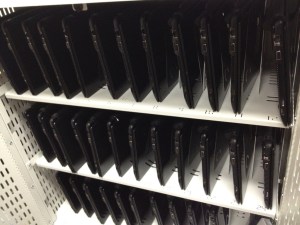
    They look so nice on day 1. Can’t wait for day 180.

    I don’t know how else to say it. Mobile device carts pretty much suck as a way to increase student access to technology. Particularly when carts are shared between classrooms. Take a school with just one mobile device cart to share between all the 3rd-5th grade classrooms. The logistics of dividing up the days and weeks for equitable cart time would make a FedEx employee cringe. Then there is the time spent taking devices in and out of the cart, hoping they are ready to go from one classroom to the next, not to mention all that time spent moving the cart around campus. We’ve all seen it, the giant cart being ferried from room to room by students in a harrowing run of bumpy side walks, stuck wheels and the grass of Doom.

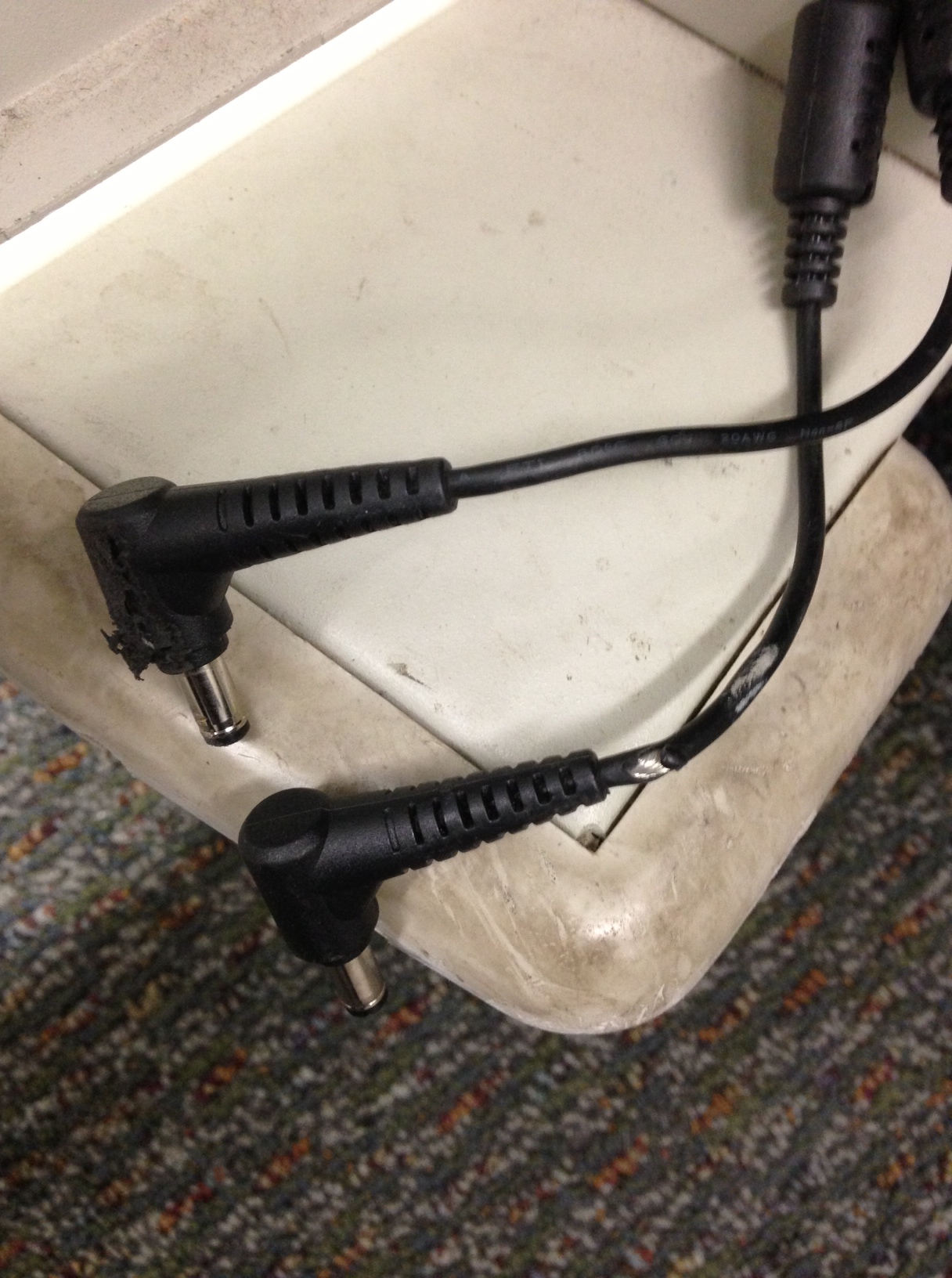
    Frayed Cables
    This cart is shared between 12 classroom

    And then there is the responsibility factor. With shared carts, no one is every truly responsible for what happens to a cart or it’s devices. All the check out sheets and daily logs in the world can’t make everyone who uses the cart care about it as much as you do. It’s inevitable that a device’s Tab key will go missing without anyone noticing for a week or one device won’t charge anymore or a cables will get crunched. Whatever it is, it won’t be anyone’s fault but it will affect everyone’s ability to use the cart effectively in their class. This is the biggest downside I see to the cart model. The cart is a Nomad. It belongs to no one.

    Now before you say, “So computer labs are better!”, let me say, No! they aren’t. Computer labs suck too, but for different reasons. Labs require dedicated space, power and cable infrastructure investments (using a 48-port switch on a table top and daisy chaining power strips along the floor doesn’t count) and fixed desktops don’t allow for flexible learning environments. That’s not to say that a dedicated media lab per school isn’t an awesome idea but labs as a way to provide daily access to technology integrated learning environments aren’t the answer.

    What about a mobile cart in every classroom then? Best of both worlds? Access for everyone, mobile, and flexible. Well, that would certainly address a lot of the issues with shared carts. For a district that doesn’t trust it’s kids to take devices home, carts in every classroom is really the only answer to increasing student access to technology on a daily basis. However the cart still represents a cost overhead that could go into buying more student devices, presents challenges with power cords, wastes time taking out and putting devices away and provides a convenient conveyance for a thief to take all 36 devices in one haul. But certainly a cart is better than no devices in the classroom at all.

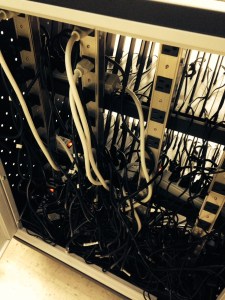
    Power Cord Mess
    Power adapters installed by the teacher. A for effort!

    The bottom line, if you haven’t guessed already, is that to me anything short of providing every student a device to take home is a half measure. It’s trying to jump the canyon in two leaps. By assigning a device to a student they have ownership of it. By allowing them to take it home, they have responsibility for taking care of it and charging it every night. We’ve been sending books home with kids for years. This really should be no different.

    That’s why I’m very disappointed in LAUSD’s 1:1 iPad roll out. The administration obviously wasn’t prepared and they didn’t adequately prepare the community. Not only that, but they approached the device as something to be controlled, as if student learning could be confined to just those bits that LAUSD determined was required. They artificially constrained the devices and missed the point of providing every student with access to an internet connected device. Worse, they made it harder for the rest of us to get 1:1 programs off the ground.

    1:1 for everyone. With open devices and lots of communication to students, parents and staff. It sends a message of trust and empowerment to students, provides the opportunities for teachers to transform learning in their classrooms, makes device support much simpler, requires less overhead for storage, power and time and spreads the risk of loss across all individuals.

    How are your carts working out for you?


  • miss-the-point
    http://forums.autodesk.com/autodesk/attachments/autodesk/248/20411/1/miss-the-point.png

    When I was a kid (back when TVs were square and 3 feet deep) and I had a question, I asked the adults in the room. I’m talking basic stuff like How tall is the empire state building? What’s the biggest animal on earth? How big is the biggest animal on earth? What happened to the dinosaurs? And no offense to any of the adults in my childhood but the answers I got from them weren’t always the most accurate. Later we got an encyclopedia set and I vaguely remember looking things up but eventually I stopped. Mainly I think because it was hard and by then comic books were more interesting to me than facts anyway. In the Army I learned all the answers (well, mostly all) could be found in the Manual given the patience to follow the troubleshooting steps (The Army had some of the most detailed technical manuals I have ever seen even to this day). Fast forward to college, where I discovered the Internet and Search. AltaVista and then Yahoo changed my life forever. During the course of my career, Google search and the Internet have taught me way more than I ever learned in college. Today search is still core to much of what I do as a technology professional and even as an educator but my effectiveness has been greatly augmented by the use of twitter and Google Hangouts. The ability to instantly connect and collaborate with other people around the world has opened up a whole other dimension to my learning. Which is why I find it so very frustrating that the power of search, social media and collaboration is still, in 2013, severely limited for students and poorly understood by the majority of educators.

    What power might that be? Well as an example, my daughter turns eight next month. She is a voracious reader and is constantly running into new things as she reads. She’s also very inquisitive but neither myself nor my wife are always around every time she has a question. And when we are around, we don’t always provide the best answers off the top of our heads either. In fact, what we do more often than not is pull out our iPhones and search for answers to her latest questions. Last year when my daughter got super excited about the Titanic, my wife searched youtube for videos about the titanic and looked up wikipedia articles about the voyage. Today the kid is searching on her own for basic research and word definitions. We have even started playing around with voice search and as that technology matures over the next few years, I’m sure my soon to be three-year old will one day stop asking mommy and daddy questions that we then look up on our phones and go straight to the source and ask Google, because the internet is all about disintermediating the middle man (in this case, the slow old parents). Especially for the basic stuff.

    Somehow my daughter, who is in 3rd grade, is now reading at a 5/6th grade level. By any definition she is functionally literate enough to make the transition from learning to read to reading to learn but in today’s analogue classroom, a classroom without a device for every student, I would argue that she remains functionally illiterate. Why? Because the world has fundamentally changed. Because being able to read through a predefined set of information laid out in a scripted order out of a textbook or being able to identify facts handed out on a worksheet are incredibly obsolete skills in today’s connected world. These are the skills of my past. They are not the skills she will need for the future. Unfortunately, these obsolete skills work just fine for school as it is today and therein lies one of the biggest challenges facing education.

    What would happen if I were to teach my daughter the effective use of Google Search and then sent her to school with an iPad and free rein to use it to look things up as needed. Imagine the potential I would have unleashed. Free of the limitations of information scarcity, she would have access to anything and everything she needed to answer just about any question she might think of. In fact as I write this, I’m trying to think of something she might want to know that she wouldn’t be able to find at least a blog post about on the Internet. And if she did come across something like that, how fun would it be to sit down with her classmates and try to find information about it together? She would not be constrained by the textbook, the workbook or even by the teacher’s knowledge of a subject. She would only be constrained by her own search abilities and her ability to collaborate with her peers. She would be empowered to find answers, discover problems and develop solutions. Her digital search literacy would define her ability to learn and her learning experience at school would be profoundly different from what it is today.

    That is why I find the notion of adopting new curriculum, even digital curriculum, (ie. new textbooks and workbooks) profoundly troubling. And yet that is the discussion many schools are having right now to prepare for the common core. You can’t teach digital search literacy with a textbook. And you can’t practice digital search literacy without regular use of internet connected devices. Private schools know this. Innovative schools know this. Heck, even LAUSD knows this at some level. Why doesn’t everyone know this? Every kid needs a device, connected to the internet and really, they needed it five years ago. In 2013, every kid needs to be empowered by edTech, not limited by it. Computer Lab time is limiting. Six computers in the back of the classroom is limiting. Shared carts once or twice a week is limiting. Computing primarily for basic skills reinforcement is limiting. Every kid needs a connected device, it should be their’s and they should be able to take it home.  In addition, they need to learn how to search. Kids should be expert searchers by the time they reach middle school. Anything less and we’re leaving our kids unprepared for the world they are living in today, not to mention the world they will inherit tomorrow.

    If I was still in the classroom and had a class set of devices, I wouldn’t worry about what apps to use or how to use the devices to cover the content or even what I wanted kids to create with them. Not at first anyway. The first thing I would teach would be search. And we’d practice it every day.

  • Saturday I presented at the CAPCUE Tech Fest 2013 event. I plan to write a post about the event itself shortly but after sharing my slide deck on twitter I was asked if there was audio of the presentation as well. Um, no. But I did more or less the same presentation for the School Leadership Summit conference back in March. So for anyone interested, here you go.

    And here is the updated slide deck (I streamlined the math in this one):


  • This is Part 5 of a multi-part VDI saga. In part 4 we left off with a split environment, two four year old overloaded SANs and a whole lot of virtual desktops running poorly on them. As SAN IOPS and disk space were two of the biggest culprits in this evolving crisis, I went looking for a solution. Enter Nimble Storage.

    Nimble CS260G

    I was introduced to Nimble storage by our County Office of Education. They were early adopters of Nimble and had only good things to say about them. So I took a hard look. At first their claims seemed like magic. VDI class IOPS on 7200RPM spindles. Impossible. In fairness to our current SAN provider, I looked at several options, including upgrading our existing system. However, to meet the actual demand of what our VDI environment had become, upgrading turned into replacement. And don’t forget I had a single controller issue that I needed to solve for our mission critical servers. I was also trying to think long term, by considering the Memory and Computing restrictions that were going to hit in April 2014 when Windows XP support goes away and we’re faced with upgrading the VDI environment to Windows 7.

    On decision day, I had three proposals before me.

    Option 1: Replace the current NetApp SAN with a flash based, dual controller model with some faster storage and continue using the existing 4 year old shelves for capacity. My main issues with this were complexity and cost. The NetApp management requires specific SAN knowledge and the 4 year old shelves would need to be replaced in short order, which would be an additional cost.

    Option 2: Replace the existing Server Blades and Chassis with the latest and greatest in integrated storage. This was actually a very elegant solution that allowed for plenty of overhead for server and storage growth in the future. However, growing the VDI infrastructure was not the direction I was headed and adding more Big Iron just wasn’t in my play book.

    Option 3: Install a 3U 36TB Nimble CS260G array and run the student desktops on it. The administration was stupid simple, the cost was less than option 1 or 2 and the solution would take next to no time to implement. The only question was, would this magical technology actually work?

    Well, I decided to find out.

    On install day, we rack-mounted the Nimble and connected the dual controllers into our 10Gbps Storage VLAN. We had a Nimble engineer onsite that walked us through configuring the interfaces and making sure everything was cabled correctly. We verified failover (there was a bug, since resolved, that actually prevented failover to the shared iSCSI IP address that took us a few hours to finally track down) and auto-support and then we started making Volumes. I have to say making volumes was easy and good thing too, because for VDI, nimble recommends no more than 50 VMs per volume. Divide 1500 by 50. Right.

    Connecting VMWare ESX 4.1 hosts to Nimble involved some configuration on the ESX host command line, which is not necessary on VMWare 5 hosts. Once that was done, the hosts connected no problem. Then it was a simple matter of moving the VDI masters over to the new data stores and re-configuring the pools to use the new volumes. It all took less than two days to complete. Once the migrations were done, the student VMs were all running on the Nimble and anecdotally, performance improved across the board.

    For the rest of the school year, storage performance faded into the background, at least for the student virtual desktops. For staff, it was another matter. Our staff virtual desktop situation progressively worsened, with desktops continuously running out of C and D drive space, running low on memory and still experiencing slow overall performance. The 8-10 year old re-purposed desktops continued to fail with intermittent errors. Our servers were still running on a single controller SAN and Server Room Air Conditioning failures and power outages were yet in our future.

    In part 6 (perhaps the final installment) – What 120% CPU utilization on a Nimble Array really means and the final solution to VDI issues in the district.

  • For the longest time my wife has been anti technology when it comes to the kids. Kid1, as our seven year old is known on twitter, wasn’t allowed on devices until just last year. But now that Kid1 is on the iPad (and ubermix netbook), of course Kid2 wants to be on it too. And low and behold my wife has been letting her! So this weekend, I come down stairs to find Kid2, who turns three next week, on her sister’s iPad learning her letters.

    iPad Alphabet

    Well cool. She obviously knows her M’s, N’s, E’s and P’s. O’s are still a little tricky. I watched her for about 5 minutes. Initially, she studiously attempted to identify the correct letter. It was obvious the one’s she knew because she tapped on them straight away. For the ones where she was uncertain, I watched her use trial and error and the game feedback to eliminate the wrong answers until she found the right one. Then at about the five minute mark, she went into silly mode and started tapping wrong letters just to get the game feedback. She moved out of learning mode to playing mode in a very short time. Unfortunately, it looks like she inherited my short attention span.

    Now this is just a “dumb” app. As far as I can tell it’s not tracking her correct responses and feeding her the one’s she’s missed or identifying the one’s she’s mixing up. I also don’t know if it’s teaching her letters or if she’s been secretly watching Word World again while her parents sleep in on Saturdays. Scary when you’re two year old knows terms like HDMI, AppleTV and NetFlix. (TV is not technology, or so I keep telling my wife)

    I then watched her move to Tangram Mania. An app where you drag shapes into their matching slots. Her drag and drop skills need work, but she definitely steps up the concentration and focus with that game. But watching her playing, I realized how limited the app was. Only one right answer, no real feedback for wrong placement of the shape and no helpful hints. It got me thinking that while there are a bazillion apps available, many of which are categorized as educational, most aren’t accessing even a 100th of the potential of the platform to facilitate learning. They lock kids into one right way and do not encourage exploration or imagination. As a parent, I have very little in the way of information to help me know what my kid knows and doesn’t know and where she needs help or more practice. It’s like we’re back in the Bard’s Tale era of educational game development but we should easily be in MMORGP land by now.

    I have to wonder, is the iPad app any better than the analogue version she was playing this morning?

    aylin playing letters

    I tend to think both are important. As limited as the letter app on the iPad is, Kid2 is being exposed to the worst technology she will ever know, to paraphrase Jaime Casap. And I think that’s important because the world has changed and will continue to change. Technology permeates everything. For better or worse. When Kid2 is four, I want her to be beyond basic navigation and operation of the device and moving into learning how to search the internet for information. We started late with Kid1. She’s just now getting into searching for word definitions, spelling and primary sources. Search is the foundational literacy skill of the 21st Century. Right up there with reading and writing, the ability to search critically, to me, is the most important skill I can pass on to my kids.

    What do I mean by search critically? Well anyone can copy and paste a question into Google, read the top answer and think they know how to search. Searching critically is the practical application of the four C’s we love to talk about in education but don’t often delivery to our kids. Creativity, Collaboration, Critical Thinking and Communication. I think that’s why so many people suck at searching for solutions. It’s easy to search for the weather, a stock market quote or flight info. It’s something else entirely to search for a solution to a problem. And at the end of the day, I want my kids to be problem identifiers and solvers. I wonder if there will ever be an app for that.

  • I’ll be presenting at a few events between now and the end of the year. In looking at my schedule like this, it’s actually kind of crazy. If you’re attending any of these events and see me walking by with my face in my phone, be sure to stop me and say hi!

    CapCUE Tech Fest 2103 September 28th:

    “Doing More With Less In A Post Desktop World”

    Fall CUE October 25th-26th:

    “Doing More With Less In A Post Desktop World”

    CETPA November 19th-22nd:

    “Chromebook Management Best Practices” (repeats twice)

    “Deploying Google Apps, What Not To Do” Co-Presented with Mark Mahacek

    “Chromebooks, iPads and Netbooks, Oh My!”

    eLearning Strategies Symposium December 6th-7th:

    “Essential Tech For Blended & Online Learning” Co-Presented with Mike Magboo

  • CDROM
    http://mauxwebmaster.deviantart.com/art/CD-ROM-Action-262674992

    Is it common to do silent reading along with a CDROM in elementary classrooms? Apparently it is something they do in our district (where my daughter is in 3rd grade). I’m wondering how reading along to a CD helps kids read? How is it even considered reading?

    If they had done this when I was a kid, I know I’d just be sitting there listening to the CD and staring at the book wishing I had a G.I. Joe comic book in front of me. Because really, what’s the point?

    My daughter is reading at a 5/6th grade level (in 3rd grade!). She reads obsessively, to the point where we have to constantly tell her to put the book down at the dinner table. Silently reading along in a grade level book to a CD? Really?

    Who exactly is this learning exercise for, because I know it’s not her.

  • I was recently asked what my AppleID strategy is for teachers and iPads. It’s very simple and it stems from an issue we have, at least in California public schools known as “Gifting” public funds. When iPads first came out, the organization that advises schools on finance matters in California released a scary document that basically said, districts shouldn’t buy an App and then have that app be redeemed to an individual’s personal AppleID account. It would be akin to buying a license for Microsoft Office and giving the DVD and Activation Code to the teacher to take home and install on their home computer. In other words, BAD.

    http://blogs.adobe.com/digitalmarketing/digital-marketing/mobile/is-your-mobile-app-in-the-top-10/
    http://blogs.adobe.com/digitalmarketing/digital-marketing/mobile/is-your-mobile-app-in-the-top-10/

    Apple’s sort of solution to this was the Volume Purchase Program (VPP). Districts setup management accounts, buy vouchers (gift cards), use the gift cards to buy App codes and then redeem the app codes to an AppleID. The problem is, the code still can’t be redeemed to a personal ID because once it has been redeemed, there is no way to get the app back from that AppleID. iOS 7 may fix this, but because Apple’s consumer release schedule doesn’t line up to the start of school, it won’t come into play until January at the soonest. The problem will still remain one of App Management. With IT staffing in schools in CA bordering on institutionally negligent for adequately building and supporting a technology infused 21st Century Learning environment, asking IT to step in and manage hundreds of teacher apps is ridiculous. Not to mention it’s totally anti-discovery and innovation which I talk about in this post here.

    Now to my solution. When issuing iPads to teachers, part of the orientation training is the creation of a “district” AppleID using the teacher’s district email address as both the AppleID and email. This process can be painful as it requires many steps and sometimes towards the end, the process fails, especially when more than a few dozen folks try and activate AppleIDs in a short time period on the same network. The nice thing though is that once the AppleID is setup, teachers “own” their App experience. It’s their iTunes account.

    The process we go through involves creating a new AppleID during the iPad setup routine. This creates an iTunes account with a payment method of “None” which allows teachers to download and update free apps all on their own! For paid apps, they must have a VPP app code from the school or district. When redeeming the app code, I emphasize that they must be logged into their district AppleID before redeeming the code. Otherwise, if they’ve logged in with their personal account to download their own apps and forget to log back in to their district account before redeeming an App code, they’ve just been gifted public funds and that is BAD (but hey, we can all get a cell phone stipend, right?).

    The very last step in the iPad orientation training is adding the iPad to our Meraki MDM solution. I don’t actively manage settings on the iPads but it’s nice to know I can push web clips, clear pass codes and change wifi settings over the air if need be.

    This AppleID system is not perfect. Setting up the initial accounts can be a real challenge. For some users, they get all the way to the apple store questions step in creating an account and they aren’t given the “None” payment option.  They have to cancel out, go to the App store, “buy” a free app (we use Google Drive, since that is the 1st app I have everyone install), choose to create a new account and then they get the “None” option. I’ve spent literally an hour setting up one teacher’s AppleID. Not fun.

    Also, I can’t reset their passwords for their AppleID accounts. This has caused a few problems, since resetting AppleID passwords can be hit or miss if people don’t remember their security questions, didn’t provide the correct birthday or miss-typed their email on the iPad during initial account setup.

    Under this setup, I don’t cede total control. Since I can access the district email account (I can reset the email account password and request an AppleID password reset email) I can always re-gain control of the iTunes account. Because of this, I can change the email address and AppleID, essentially re-claiming those apps for assignment to another teacher. There is a potentially annoying minor issue with this capability as well, anyone care to guess what it might be? In real life, would I spend the time required to do this? Probably not.

    The bottom line is that apps are consumables like paper and ink (with the exception of certain SpecialEd apps that cost a lot). Districts need to start budgeting for Apps like they do paper and pencils. The alternative is a mess of management, bureaucracy and control that will only serve to impede learning in the classroom and make ubiquitous technology adoption in education fail yet again.

    As a side note: On my wish list with Apple is LDAP integration for AppleID accounts (or at least a CSV upload) and an SSO option for passwords. What I need to make things work really well is one account repository.  A singe username and password to rule them all for teachers. Because if there is one thing that I’ve learned in the last four months of handing out hundreds of teacher iPads, it’s that not everyone is comfortable managing multiple accounts (Windows, iTunes, SIS, Google Apps, HR Portal, Website CMS, etc…) across several platforms. Yes, it’s 2013 and that’s pretty much the norm but most classrooms still operate in the 19th century and change is hard.

    Got a better AppleID strategy? I’d love to hear it.

  • I just spent $6.99 for the FluencyFinder app for my iPad. It was an impulse buy, granted but after having read about it in a blog post, it looked like an app I should be familiar with. But then, I do admit to a compulsive app buying habit dating back to my first iPad when not even 5 minutes after finishing the setup I had paid $19.95 of my own cash and was crashing the wifi network downloading the Elements app (remember when that was like THE app for ipad?).

    Since then, I’ve avoided the VPP process like the plague, preferring to pay my own way through app exploration and experimentation (much to my wife’s displeasure at the monthly iTunes bills). Over the years I’ve built up quite a library of Apps on my personal iTunes account, 99.5% of which I never use. When I started using a Nexus 7, I once again went down the personal app route, buying apps associated with my personal gmail account.

    I chose this route in the beginning because there were very few alternatives at the time. Now as I’m handing out iPads to teachers en mass and making them create “district” iTunes accounts with their work email addresses so that they can redeem district purchased apps to a district account, I’m reminded of why I’ve stuck with just buying my own apps even in the face of VPP.

    It’s just easier. There is no app request form, no two week wait for approval, no logging in on my iPad to install personal apps and logging out and back in with my work account to install district apps. It’s easier, which means when I see an app I think might be useful or that looks interesting, I buy it, try it and then I know. And what’s more, an app that I find doesn’t work for me, may fit into someone else’s work flow beautifully.

    That’s why App discovery and evaluation to me is a perfect example of 21st Century Skills in action. The search for an app, the critical assessment of an app, the practical integration of an app into instruction and hopefully, the sharing out of that process through social media to pay it forward for the common good. To impede that process by trying to control it seems very 19th century to me. So I’ve been thinking what we should be doing is giving every educator the opportunity (and expectation) to explore, experiment, fail, succeed and share with Apps. The best way to do this is to eliminate the red tape and give everyone an App Budget with permission to play. I propose just one requirement; that they share their app discovery with their peers throughout the year.

    What do you think? Do you know of any districts that have taken this approach? I’d love to hear your thoughts.

  • Power went out at the District Office (DO) today at around 5:30pm. The outage affected a large area of our community. With only 25 minutes of backup battery time on our servers, we only had a few minutes to shutdown everything. At least we had that time. No, we don’t have automated shutdown scripts in place. We have a klugey UPS setup with several separate units powering each rack. As for automating the shutdown, we have two Dell Chassis, 36 Blade Servers, VMWare 4.1, Windows 2008, 2003 and Linux, NetApp, the Core Network, Cisco VoIP/Unity and Nimble to contend with.  Getting it all automated would require a serious Professional Services engagement. And really who has money for that these days?

    While pretty much everything hosted at the DO went down, email stayed up, being that it is hosted “in the cloud” and 3g/4g access worked as backup for those of us with smartphones. I’m seriously considering getting a dedicated 4G backup Internet connection and isolating some key network components/ports on a beefy UPS (like the IT offices), for just such events.

    After several hours of manually bringing systems back online, it looks like the act of gracefully shutting down the 4.1 VCenter Server and DB Server made a huge difference. Not nearly as many orphaned VMs as after a hard down. And the new 5.1 VMWare VCenter instance that I recently built fired up right away when the hosts came back online. I’m really loving that little VMWare appliance.

    We still have things to work on, like fixing the 6509 so the sups boot up automatically, making sure the redundant routers are actually configured for redundancy (they aren’t! but we’ll actually be removing them soon anyway) and the interfaces are not administratively down. I also want to add a DHCP, DNS and AD server outside the Dell Chassis/VMWare stack so we can get network services back up and running a bit faster. And it looks like we need to assign static IPs to the Meraki Access Points, if we want them to come up before the DHCP server.

    It would also be nice if our Generator wasn’t parked five blocks down the street in the M&O yard. It took an hour for it to get driven over to the DO and hooked up, by which time we were already down for 30 minutes. But once the generator was up and running we were able to get systems back online even before power was restored to the neighborhood.

    All in all, it could have been a worse day. I mean, it’s not like the server room overheated or anything.