I’m in the Chromebook Lab (Rm 104) at the CETPA Annual Conference.
thinking out loud about technology, education and life
I’m in the Chromebook Lab (Rm 104) at the CETPA Annual Conference.
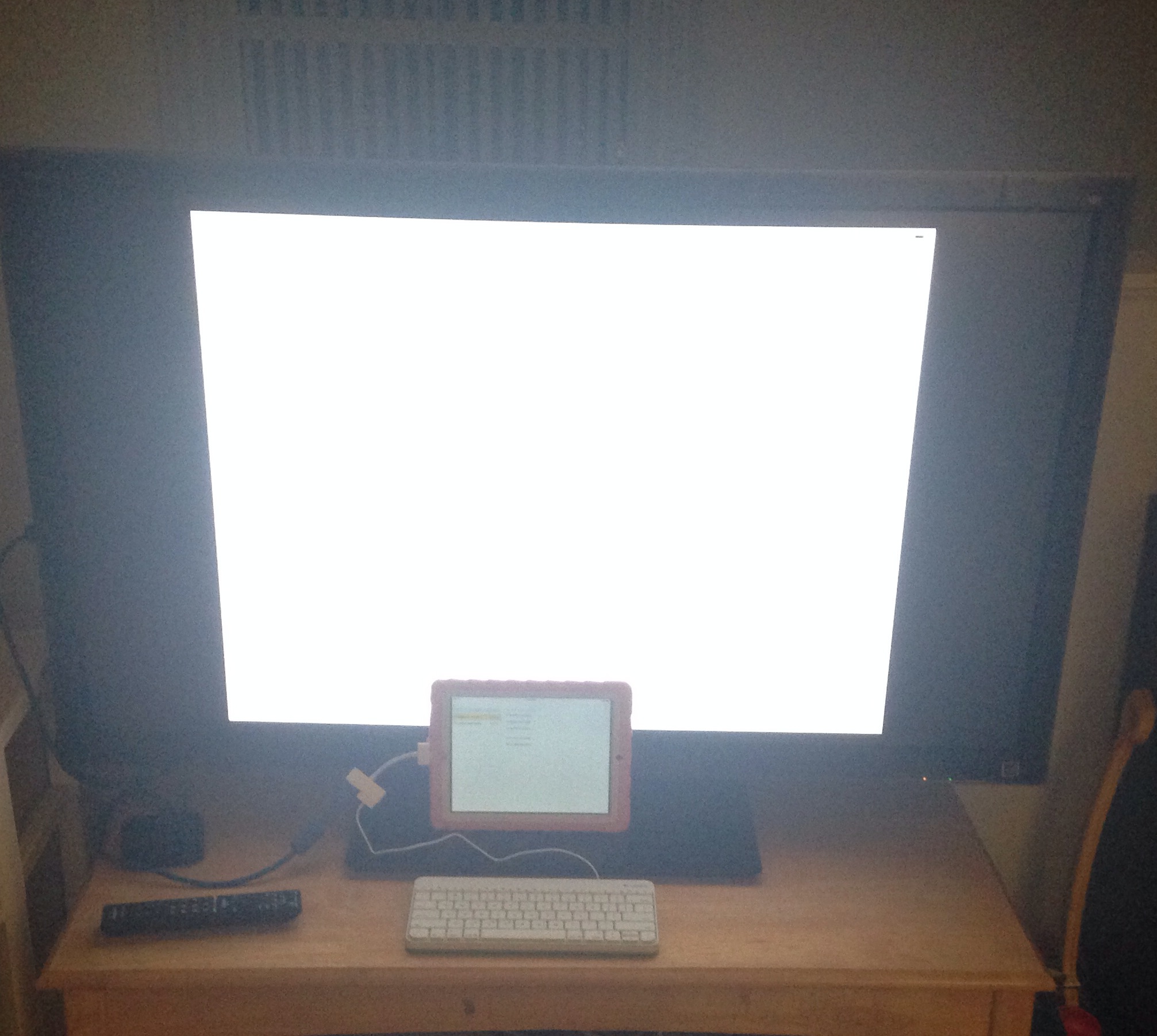
There has been much discussion about the best way to administer the SBAC test on iPads. Look no further. Follow this simple 5 step process and you’ll be all set.
Step 1: Buy a Digital AV HDMI Adapter (brand unknown)
Step 2: Buy a Logitech Wired Keyboard For iPad (30-Pin)
Step 3: Connect HDMI Adapter to iPad2
Step 4: Connect Keyboard to HDMI Adapter
Step 5: Connect HDMI Adapter to External (HDMI) Monitor
Test Away!
Shout out to Joe Ayala for the idea! It Works!
I’ve about had it with this whole G+ Custom URL thing.
I’ve been anotherschwab on the web since setting up my hotmail account in 1997. I’ve been anotherschwab on Yahoo, Excite and a bunch of other services that have come and gone. With the rise of twitter, @anotherschwab became the name I used in real life at edtech conferences to introduce myself to fellow twitter users. anotherschwab is my Neo to Keanu Reaves’ Tom Anderson in The Matrix. Which name is my real name anyway?
So when Google+ custom URLs starting becoming available, I immediately requested +anotherschwab. A request that has now been pending for over a week. I requested +anotherschwab not because I’m not +AndrewSchwab or +AndrewTSchwab (frustratingly +AndrewSchwab is stuck to my Work Google+ account and when I tried switching the names around I lost my Verified status on my personal G+ account and got that goofey add suffix option to boot) but because everything I do online ties back to anotherschwab. It’s the name I use to sign into Google+ for crying out loud! What’s next, making us change gmail account names to be our “real” names?
Interestingly enough there is a (more?) famous Andrew Schwab out there on the Interwebs. TheAndrewSchwab isn’t me (but apparently I beat him to twitter when I grabbed Andrew Schwab just in case) but we both have the same name. So who’s to say who should be +AndrewSchwab or +AndrewtSchwab or even +TheAndrewSchwab on Google+. How is +TheAndrewSchwab any more real of a name than +anotherschwab? What if I choose +AndrewSchwab3? How am I distinguishable online from +AndrewSchwab2 or +AndrewSchwab222?
This whole G+ custom URL thing is totally goofey. I’m anotherschwab online. I always have been and always will be and until Google wakes up and lets me identify myself how I want, I’ll still be 104368693201320825023 (unless they force something else on me).
How about it, are you happy with your Custom URL options?
PS: I ended up with anotherschwab because after spending way too much time flipping through crazy first name, last name, letter combos on hotmail (I was late to that party), I finally gave up and said if there are so many aschwab’s out there, I must be just anotherschwab.
I’ve been averaging an edtech conference a month for a few years now, and in some months, like this upcoming February, I’ll be at edtech events three Saturdays in a row. Obviously this puts a bit of a strain on the family what with two kids and the wife and all. It gets even more interesting with Kid1’s endless swim meets (I think my wife thinks I sign up for all these edtech conferences just to escape the volunteer hours at the meet, upon reflection, she might be on to something). But no. I love attending the local, and not so local, edtech conferences. I think they are critical, especially now, with how rapidly technology is changing what it means to learn and teach. Not being in a classroom on a daily basis anymore makes these events even more meaningful to me. And hanging out with other people passionate about learning and teaching to give up their Saturdays to do the same is refreshing and gives me much needed hope after spending my weeks at the District Office, where we are all far too insulated from the art of teaching and learning.
I’m wondering how might I balance my family time (that’s a wife term) with my love for edtech and the opportunity to connect with other educators. Which got me thinking, why not a family friendly edtech event? Has anyone held these on purpose before? I know @dowbiggin and I have been seen toting our kids around at edtech conferences in the past. How about one designed specifically with that in mind? Most of these edtech conferences are held on school campuses. Some even have playgrounds. Why not have a playzone for the kids and a potluck or family picnic lunch time? Would anyone come? Maybe I’m just getting old and this is crazy think (although I’m not quite as old as @vollmert805, who is older than dirt) What do you think? Crazy or worth pursuing?
Working in a modern day manufacturing facility, data was all around me. As the IT Manager at Quebecor World’s Merced Plant, my team was responsible for the plant dash board. A web based application that collected and showed the plant’s production performance in real time, pulling in data from hundreds of sensors throughout the production process. It was quite amazing to see. We were constantly making the UI easier to read and more powerful for users. The ability to drill down and adjust production on the fly was incredible. Reviewing historical performance and being able to adjust and re-adjust processes for improved performance and see the results in real time was invaluable. It saved the Plant hundreds of thousands of dollars annually and paid for itself many times over. That system of data collection and display helped make that plant one o the most innovative printing facilities in the world.
We have data in education too. It’s not real time and it hardly ever gets used to impact current performance, but we do have it. Since coming over to K12, I’ve often wondered why we don’t have dashboards for data in schools. Real time readouts with learning metrics, attendance stats, facilities conditions in one simple view or every principal to see. And similar dashboards for teachers, with all of a student’s performance data displayed in easy to read graphs and charts. Unfortunately I’ve never had the resources of Programmers in K12 to delve into the concept.
That’s why I am fascinated by systems like Khan Academy’s Learning Dashboard and BrightByte’s Clarity for Schools. Both represent powerful uses of data and move education closer to the world of learning analytics. It’s becoming possible to get bigger views of whats happening in schools, from student achievement to the impact of technology PD in the classroom. Being able to capture data and present it in a user friendly and useful manner is getting easier every day.
SBAC promises even more potential with data in the form of the Formative Assessments that should give teachers a (more or less) continuous view into student learning. I’m excited or the potential of data in education and quite frankly I’m surprised the big Student Information System (SIS) vendors haven’t figured this out yet. As a parent, I would love to see a something like a Learning Dashboard for my kid. But then again, a classroom blog would work for me too.
Every school district I’ve ever worked with has done two things terribly in my opinion (at least prior to my arrival). The first is plan for technology in a sustainable and strategic way and the second is to provide adequate support for technology use in the classroom. I can attribute both to the lack of a Cabinet level technology leader involved in the day to day decision making discussions of the district.
It strikes me as profoundly short sighted that in the rush to test every California kid on computers in March 2014, these two fundamental flaws in many school district’s thinking are not being addressed.
I just met with a school district that realized they needed someone to help them through these interesting times, however they weren’t willing to commit all the way for a cabinet level position reporting to the Superintendent, instead opting for a position reporting between Business and C&I. Having reported to two different departments once before, I can personally say this is a recipe for disaster. But they are trying and that’s an important point. Another district I know of is trying as well and they appear to have gotten it right, posting for a Cabinet Level CTO position reporting to the Superintendent to help guide them through these technologically challenging times. Unfortunately there doesn’t appear to be much guidance on this from the existing leadership organizations, and that’s really too bad. So here is my take on it.
In the absence of a CTO to guide them, many school districts are using their one time Common Core money to solve what they think are their readiness troubles (ie. buying devices by the pallet load) but these plans are short sighted. Long after that one time money is gone, online testing and the learning environments needed to prepare kids for 21st century literacy will require a constant refresh of equipment and a level of technical support most schools have never known.
So why have schools historically never invested in regular technology updates or enough technical support? Well, for starters, technology hasn’t been a fundamental need in schools before now. Sure, certain programs may have required a school computer lab or a classroom mini lab but these have generally always been school driven and funded. And then usually with one time dollars and no plan for hardware obsolescence or replacement. Daily integration of technology into instruction on a district wide scale is completely new for most and to think a district can succeed with common core and online assessments without increased student access to technology is just plain crazy.
Along the same lines, in many school districts there has never been a concrete relationship between the number of devices a school purchases and the amount of support the district provides. In my experience, individual schools have been able to add more and more devices and keep older and older systems running while expecting the same level of support from the continuously stretched District IT departments.
And while there are ways to mitigate some of this through communication between Principals and IT, the use of technology committees and district standards, nothing is more effective than a Cabinet level CTO who can bridge the gap between Business and Instruction and guide the district strategically through what is now a constantly changing technology landscape with profound implications for student learning and assessment.
The SBAC challenge is a major structural problem facing districts and many are ill prepared to address the scale of technology that it requires. Districts need CTOs now more than ever to inform and guide them through to the other side of SBAC and the future beyond with online and blended learning, virtual schools and learning analytics.
At a basic level, how a district funds and purchases devices has to change. How support is funded, allocated and structured has to change. How technology is used in the district, in school offices and in classrooms has to change. All of this can’t be done from a second tier seat on the back end of the leadership team.
And when it comes to technology support for the classroom, building an expectation for daily technology integration which relies on technology to work more often than not requires a support system more like modern business has been using for the past two decades than schools have ever been used to before. Schools have some of the worst device to support staff ratios in the business world. In an environment where technology down time was acceptable or at least tolerated, these high ratios were ok. But moving into environments where down time measured in days will have serious impacts on student learning and the ability to administer online assessments, support ratios are going to have to change. Some districts are already in the process of hiring more tech support staff and creating help desks with live people manning the phones for immediate tech support. Who is driving these changes in districts without CTOs? Is anyone listening?
In addition to basic technical support, teachers and principals need support integrating technology into their instruction like never before. It’s not just enough to make sure the tech works, the district needs to provide resources to help teachers integrate it into their daily instruction because not knowing about technology is no longer an acceptable answer.
Let me reiterate that, online adaptive assessments are not a school problem. Districts can’t leave these decisions up to principals the same way they’ve left technology decisions to them in the past. That has led to the situation I see at many Districts, where some principals invest in computers, support and technology for students and others do not; creating an uneven distribution of technology access for students. Districts are going to have to step up and start owning technology from start to finish if reliable online assessment results are important to them. Kids are going to need screen time to be ready for the tests. All kids, not just the ones that go to the school where the PTA fund raises for computer labs.
A district without a CTO at the table has a good chance of missing the forest for the trees. With a CTO on board; making sure technology is integrated into common core implementation plans and the strategic long term vision of the district, the district will ensure that it isn’t just being reactionary and doesn’t find itself unprepared for the many changes being driven by the rapid advances of technology in the education policy making space.
It’s important to note that none of this is about the technology. It’s all about providing teachers and students access to the resources that are taken for granted everywhere else in the modern world but in our classrooms. It’s about preparing districts for the 21st Century and Common Core. It’s about building schools and school cultures where students want to learn. It’s about empowering teachers through technology to become better teachers. It’s about preparing kids for their unknown futures and districts for the unknown challenges yet to come.
Cabinet or bust!
Just a random thought exercise. By no means definitive.
What did I miss?
What does a kid need to learn these days? If you believe as I do that access to the Internet is a fundamental requirement for learning and living in the 21st Century, then the next question to ask is what is the best device to achieve that? It’s a question I hear asked often. Everyone seems to want a simple answer. Buy this device, it’s common core ready. Or buy this device, it’s SBAC ready. Or buy this device because it’s the IT department’s standard and it can be “managed” and supported the way we’ve always done it. Well, I suppose there are some factors that need to be considered but my requirements for a 1:1 device for all students are fairly basic. I did agree to hand out iPads to High School students, after all.
I believe a student’s everyday device should do three things really well. I’m leaning on my everyday device (iPhone) use for guidance here. First, the device’s battery has to last under heavy use through the entire school day. If the device has to be charged in the middle of the day, that presents all kinds of access issues. Ideally, the device would last a day and a half, given that some kids might forget to charge over night. Not that I have ever forgotten to charge my iPhone. Second, a student device has to be cheap and relatively durable. These devices will see a lot of wear and tear. Some will be stolen, some will be broken. It’s possible to wrap devices in protective cases to achieve durability, but it would be nice if they were semi-decent out of box. And last but not least, the device has to perform. It needs decent specs, good speed, a responsive touch screen or trackpad and it has to have wireless 5GHz connectivity because it needs to get kids onto the Internet in high density environments.
What does cheap mean to me? Well, as someone who works for a public school, it means sub $300 per device. This knocks out quite a few devices right away and leaves us with basically Chromebooks, 11.6″ Notebooks, iPad minis (if we close one eye and squint past $29) and 7″ Android tablets. Of the four, the 7″ Android tablet, specifically the Nexus 7, pretty much beats all the rest on price and handily meets the other two requirements. So why isn’t every school in CA buying these low cost Internet connected devices for students? Well, I think the main reason is because our new next generation 21st Century tests won’t work on a 7″ screen. A light weight, inexpensive device that can access the world’s knowledge yet we can’t give one to every student because the “new” online tests were written for desktops? Desktops are done. It’s Ridiculous.

But lets pursue the 7″ tablet idea further and pretend that perhaps we still can provide every student a low cost tablet (I really wish google made a $150 wifi only Nexus 4) while living in a utopian world where we might buy carts of Chromebooks for our testing labs to meet the requirements of the folks in Sacramento.
What might students be able to do on a daily basis with a device that has no physical keyboard and only a 7″ screen? Well quite a lot if my wife’s computing experience over the past year is any indication of how the world has changed. Everything that she used to do on her Laptop she now does on her iPhone, including reading, shopping, bill paying, registering the kids for activities. Everything. Up until I got Printopia setup, the only reason she ever had to use the Laptop anymore was to print. And now that’s no longer an issue. Granted, she’s not writing 5 page essays anymore. But she’s posting on Facebook, communicating daily with her friends and family via iMessage and recording pictures and videos of the kids. She’s creating content as well as accessing it just fine on that dinky 4″ iPhone 5 screen. I think a small, light weight, affordable, portable device is the perfect way to go in education. It would get every kid connected, affordably and immediately. If not for the silly tests and their 10″ screen size and physical keyboard requirements.
So back to reality, if it weren’t for SBAC, I think I’d be advocating for 1:1 tablets for kids (7″ Androids for cost, unless Apple gets on the ball with the iPad mini pricing next week) with a few Chromebooks in every classroom and a few Chromebook carts in every Library. Google Apps for Education (GAFE) would be the bridge between the devices and students would have access to their content on any device, anywhere and anytime. But SBAC is here and providing an equitable testing solution for all students is going to be a real challenge for many schools. The hodge podge of devices currently found in my district’s schools provide neither ubiquitous Internet access for students nor a robust and standardized testing platform. We really need to move to a 1:1 device scenario and when we do, the solution will be more costly and a bit stuck in the past all so that we can support a test platform that was built in the early days of the Internet.
The world is quickly moving towards mobile and just as the Education community begins to realize the importance of preparing kids for their futures using the same technology rich experiences they are used to using outside the classroom, we should be very conscious of the incredibly rapid pace of change happening in that world right now. Mobile is the future. Tablets are the future. Are we testing kids for their future? Not without mobile and touch we’re not.
I usually don’t post episodes of my rebootED and smallschoolbigtech podcasts (videocasts?) on this blog because after all, each show has its own site where they live. They also can be found on YouTube and iTunes but for all that, discovery is still an issue. I’m no marketing genius and wether or not anybody watches or listens isn’t really why I spend the time and energy to post them. If nobody watched, I’d still do it because it’s an amazing learning experience for me. Just like writing this blog. However, occasionally an episode comes along that I think is pretty awesome and I’d really like people to discover. This happens to be one of them. So watch or not, it’s up to you but in this rebootED episode Mike and I reflect on new models for PD, EdTech choices for the classroom, new Pedagogy for 1:1 and changing culture in schools.
So iOS 7 happened. Two months into the start of a new school year. Again. And right after we handed out iPads to teachers and students. All that UI training, gone. Poof. The number one question I get now; “Where did the airplay icon go?” Seriously. Maybe it’s a good thing people can’t find it, because teachers are no longer able to airplay for more than a few minutes before the connection drops. Just as we had teachers excited about using Mirroring in their classrooms, iOS 7 happened. The solution? Power down the iPad and restart. Not exactly the user friendly iOS 6 that made tech in the classroom easy.
And Configurator? Well, all I can say is thanks for setting the default behavior to update to the current iOS, cause that’s what they all did. Before we changed it to never. Unfortunately there are some apps that just plain demand iOS 7. I guess they are too good for iOS 6 now. That means we can’t load them onto iPads that we haven’t updated which means teachers can’t use them, which pretty much defeats the purpose of the iPads because they run Apps, it’s what they do. But if we update to iOS 7 to install the Apps teachers want, we might have to un-supervise and re-supervise them all, and that’s not much fun. We’ll also lose our Management profile, which doesn’t like to load via Configurator for some reason. Oh, and we have to go through the Welcome screen again. Sometimes the old wifi settings stick and sometimes they don’t. It’s quite the mess really.
And don’t get me started on VPP and all the promises of over the air app installation and supervision. It’s October. Where are all the things that mattered to us in education? Sure the interface is more Android like, but can I pull an app back from an AppleID yet? No. It’s not nice to tease.
Today I was using Skitch on my iPad mini which has been on iOS 7 since day one and after a few app crashes, the whole iPad totally crashed. It went into a restart during my demo. The only thing missing was a BSOD. Not cool iOS 7, not cool at all.
All in all, this has been the worst iOS update since I’ve been working with iPads in education (like the iPad 1!). Everything that was good and right with the iPad for the classroom is basically broken at the moment. It’s time for a fix Apple. Past time.