• I’ve been meaning to write a post about our path down the flexible learning spaces journey and today coincidentally found myself having to write something on the topic for my LEC PLL course. We are 7 months into piloting “flexible” furniture in seven classrooms from VS, Smith, Paragon and Balt. Below is a reflection on how we started and where we’re going next:

    It all starts with a concept, based on discussions about what we think we want to do in the classroom. We know that desks in rows do not lend themselves to collaborative learning. We also know that rigid seating leaves students without freedom of movement. Desks and chairs without wheels make reconfiguring spaces quickly a challenge and therefore much less likely to happen often. We know this from observation and conversation. So we collaborate with a furniture distributor that specializes in flexible learning environments in schools. We brainstorm, look at options, examine our spaces, budgets and learning objectives and the results of all of those discussion are turned into 2D renderings.

    21stC Furniture 1

    Then, after refining the size, shape and layouts based on the 2D renders, because collaboration tables are bigger than we thought or we just can’t fit 34 desks and chairs in the space the way we want, 3D renders are made and we really start to visualize what the space will actually look like.

    21stC 3D 1

    Once everyone agrees to a layout and equipment list, we discuss finishes. Light table tops show dirt. Dark table tops show dirt. Wood grain table tops show the least amount of dirt. Chairs will get dirty, do we want colors that show it or hide it? Do we want different colors or a standard color that is easier to replace and move from school to school. Once all of these questions are answered, the furniture is ordered and the conceptual becomes reality.

    21stC Pilot

    This is where reality sets in. We learn a lot about furniture. Making the transition from a static, standardized classroom to a flexible, dynamic learning space is a huge leap. Some assumptions are wrong. Both 2D and 3D space is different than the real classroom. Tables could be a little narrower to facilitate groups of four collaboration. Different desk shapes work well for groups of six but not four or five. Chairs with wheels have bigger footprints than we are used to and legs that stick out further into the isles. We find out that trying to add new furniture in with existing furniture makes for tight spaces. Layout is important as well, for movement isles as well as for seat alignment.

    We come back, evaluate and start again. This time with the following lessons learned:

    1. Transforming a classroom space is a major disrupting force. One that not every teacher is necessarily ready to take on. Teachers that agree to take on the challenge have to be willing to clear their classrooms of existing furniture but also be prepared to question their pre-existing notions of what a classroom should look like and how they and their students should interact with the learning environment.
    2. Students must be involved in the process from the beginning. Teachers need to have students participate in the exploration, reconfiguration and feedback loop for the flexible learning spaces.
    3. One size will not fit all. Finding a desk shape with the most flexible configuration is important. It’s amazing how flexible the old reliable rectangle is. It does groups of 4, 5 and 6 very well. New desks should also do these well but also provide for circles and curves and other shapes.
    4. Storage is a challenge. Teachers have a lot of stuff. It accumulates over time. Also, elementary students don’t travel the way middle and high school students do, so they are used to having their own book box to store things in. The flexible furniture of today doesn’t come with a book box option. Wire baskets are available and they are a must.
    5. Wheels on everything. Tables, chairs, everything.
    6. Standing height tables and cafe stools are very popular with students. Allowing options for seating throughout the day seems to be important, however moving past the idea that every student has to be sitting at the exact same desk is an obstacle to truly flexible learning environments.
    7. Teachers need a place to present from, but it shouldn’t have to be at the front of the classroom. A mobile standing height platform with storage is popular with teachers. This is in addition to a teacher desk for one on one student collaboration.
    8. Flip top tables in a custom 20”x60” size for middle school. And maybe for Elementary too for teachers that don’t require book boxes. We’ll be piloting some of these in the next round.

    Whereas the first round of pilot classrooms were really shots in the dark about what flexible learning environments should look like, the next round of classrooms has a much more focused design. We have an individual desk shape we think is flexible enough to meet most needs. We’ve refined the table for the middle school classrooms and will be trying it out in elementary classrooms as well. And we have several chair options that we are looking at since we’re finding the wheeled chair to be the most difficult piece of the puzzle.

    Next up is finalizing designs, creating equipment lists for each classroom and placing the order. Another thing I’ve learned is that furniture has long lead times. Trying to condense the feedback loop with classroom teachers has also been a time challenge. With another 10 classrooms entering the pilot, I’m sure we’ll be getting great feedback. This time, I’m hoping to validate what we know now and come up with a set of district standards that work for us moving forward.

    But to hedge our bets, I’m also ordering our own “Pilot” set of classroom furniture for the district office, so we can push it into classrooms, swap out components in our pilot classrooms and generally be more flexible without having to relay on vendor samples and availability.

    Who knew furniture could be so fun?

  • Wow, using google translate with the kids to explore how to say “Excuse Me” in other languages. Only five years ago they would have had to listen to me butcher the pronunciations and we would have been limited to Spanish, French and German. How the world has changed.

    Kid1 Using Google Translate


  • My District is looking for amazing educators to fill two brand new Instructional Tech ToSA positions for next year. These positions will report to me (the CTO) in the Technology Services Department and have the opportunity to work with Mary Fran Lynch, our current #eduawesome Instructional Technology ToSA.

    We’re a Google Apps District, MacBooks and iPads for all teachers, 70″ LED TVs, AppleTVs and Chromecasts are being installed in every classroom this summer. We are 1:1 Chromebooks 3-6th with a 6th grade 1:1 take home starting next year. We are also piloting tablets (iPads and nexus 7) and chromebooks in K-2. We currently have 7 flexible learning pilot classrooms, expanding to even more next year. Great things are happening in Union School District!

    We have 3 Google Certified Teachers on staff and just had 5 Teachers accepted into the 2015 MERIT Cohort at the Krause Center for Innovation. Our teachers are exceptional and I hope and expect that several will apply for the positions but if you think you’re up for the challenge and are ready to bring your edTech A game to a future ready district, consider applying. You can see more details on edjoin: https://www.edjoin.org/Home/JobPosting/655663

  • Hotel Lobby Session Idea:

    For any IT centric folks, I’m thinking about facilitating a session in the Renaissance Lobby sometime during the CUE conference. Preliminary title, “Chromebooks: The How and the Why” or alternatively, “iPads: Not Yet, Because”.

    What do you think?


  • I just got back from #edCampSV and once again it was a day well spent. I attended two sessions in the morning, both involved great conversations around teaching and learning. The first session revolved around the very real challenges of integrating technology into classroom instruction from the perspective of two willing (but under supported by their district) teachers. The second session was all about building maker spaces and what others are doing to bring making into their schools. I then spent a very long lunch (we basically had our own session three at the lunch benches) talking about the future of edtech professional development. To sum that one up; more Pedagogy, less Cool Tools.

    Upon returning home, I got to thinking, we should aspire to have edCamps happening on school campuses every day. It’s a format for meaningful collaboration and it’s educators having face to face discussions around common themes of teaching and learning. And not only for teachers, but for students, parents and administrators too. Building forums for open communication and collaboration, for sharing ideas, failures, successes and strategies are what being a connected learner is all about. So, have an edCamp every day on your campus. In the staff lounge, in your classroom, post a few topics and get together to discuss. It’s a powerful model for collaboration and learning and sometimes it’s refreshing to take a break from the tech tool overload, slow down, sit down and just talk. What do you think about that?

  • Google Classroom came a few years too late to rescue me from Moodle and Google Docs folder management nuclear winter but it’s out now and teachers are picking it up like wildfire. Early critics, myself included, criticized Classroom for all the things it didn’t do when in fact the simplicity of it is probably a big factor in it’s rapid adoption among “non-techie” classroom teachers. As more teachers have started using it, feedback and feature requests have started to roll in. Rather than try and remember all the ideas and issues teachers have had with Classroom in my district, I think Jeremy Davis (@teachtech) from Capistrano Unified School District hits the nail on the head with these 7:

    1. It would be amazing if our classrooms automatically generated a group with the same name so teachers could assign google play apps, extensions, and books to their classes. Maybe even a play store button on the classroom screen.

    2. The student count next to the word students on the main screen would be huge, because as students join the class, if the total was in parentheses next to the word students teachers would know when everyone was in and could disable the code so no stragglers popped in (parents, friends, other students who want to get the work ahead of time)

    3. Student View – A lot of teachers want to show off a student view (I need this during training as well) but we can’t manage 2000 dummy accounts for teachers. If there was a “student view” button in the stream that would flip the classroom to what the students see, it would be easier to teach.

    4. We would really love it if we could assign group work – When a teacher goes to assign work and wants multiple students working on the same template from Drive, they now will assign, it creates 35 copies, then the teacher asks one student from a group to go in and change the name on the assignment to include the last names of each of the students in the group, then the teacher has to go in and either delete the 20 copies that aren’t being used or just figure it out on the grid. If there was a fourth option in Classroom, “assign by group” that would pull up a list of all students in the class, with a drop down A-Z menu next to each name, then the teacher could assign John, Sally, and Jose to group A, Joe, Eric and Adam to group B, etc. Then Classroom would make a shared document between the selected students and the teacher. That is one of our most asked-for features.

    5. Timed assignments and date fix – We love that teachers can make an assignment and then select all 5 classes and assign it all at once. However, this doesn’t work so well if the teacher is pushing out an assessment. If they push to all classes at once, the students who don’t have her class until 1pm get the essay question at 8am. If there was any way to have a timer next to each class, so when you drop down and select the 5 classes to send the assignment, you could also select a time. Schools across the country have strange bell schedules, so you would want it in 5 minute increments. But if I could select Period 1 gets it at 8:05, Period 2 gets it at 8:55, Period 3 gets it after snack at 10:00, and so forth that would make things easy on assigning. Lastly, we have gotten reports that when a teacher selects multiple classes to assign, the date and time due do not transfer over to other classes. Is this a known issue?

    6. When we look at assignments in grid in the assignment folder, every assignment has the same name, and the student name is cut off unless you mouse over and click. There is no way to get a quick glance. Is there any way that google could put the student name before the title of the assignment rather than on the end?

    7. (also known as “the dream”) We would really, really like a snapshot button on classroom, that would take a quick snapshot of every student’s screen and create a quick grid with names for teachers. This would allow us greater classroom management (even just letting the students know it is possible) so teachers can feel more comfortable having side bar conferences and one-on-one coaching with students where they can’t see the screens of students. While some may ask for a live feed, the screenshot would not tax our networks in the same way.

    Ditto! Seems pretty reasonable to me. What do you want to see from Google Classroom in the next 3-12 months?

  • http://cdn3.volusion.com/sbcpn.tjpek/v/vspfiles/photos/FACE001C-2.jpg
    http://cdn3.volusion.com/sbcpn.tjpek/v/vspfiles/photos/FACE001C-2.jpg


    Sadly it looks like InfuseLearning is shutting down. You can read their announcement here. I did not personally use InfuseLearning but I saw Jon Corippo (@jcorippo) demonstrate it’s learning power many times. Had I still been in the classroom, I’m sure I would have used it straight away. InfuseLearning is not the first education based tech start up to build a great product that teachers and students love only to disappear for lack of a business model. I think the problem is that schools aren’t used to paying for software (unless it’s Microsoft Office). Historically, schools pay for curriculum packages, learning management systems, traditional assessment programs and drill and kill skills based applications but not innovative workflow apps like Infuse. In fact, I don’t think that Google Apps ever would have caught on and Google Classroom wouldn’t be the overnight success it is if schools had been required to actually pay for them. Thankfully google doesn’t have to make money off of these services, yet.

    Absent district purchases, companies are left trying to make money through ads or worse, classroom teachers. Teachers can only afford to pay so much so products like InfuseLearning are up against steep hurdles if they expect to generate revenue without district buy in. Too bad a company like Apple doesn’t take the opportunity to swoop in, pick up InfuseLearning and continue to develop it as a free for educators tool. It works great on the iOS platform. And yes, even if they took it iOS only, at least it might give schools a reason to keep buying iPads. On second thought, it would be even cooler if Google bought them and integrated the InfuseLearning feature set into Classroom.

    We used to say that in the age of Web 2.0, a new tool would always rise from the ashes of a failed one but i’m not so sure anymore.


  • CTO

    If you’ve been following me for any length of time you may remember a rant a while back about the importance for school districts to embrace technology as a “real” department, going so far as to say a Cabinet level Chief Technology Officer or “CTO” was a key requirement to successfully infusing technology into a district at the level that is required to meet the education, teaching and learning challenges of the future (with the future being last week, of course).

    Well, having been in a Cabinet level CTO position now for the past 12 months I have some additional thoughts on the subject. So here goes.

    In discussing the ability to push change in a district with colleagues and peers, the most important single factor above all else remains having a seat on Cabinet. Having that seat at the table when district decisions are being made is critical. Exceptional individuals can support technology without being on cabinet to be sure, but it is exponentially more difficult to push initiatives or transformative change from outside Cabinet. I personally think reporting to the Superintendent is equally as critical, because pushing technology transformation can potentially be uncomfortable for both the Education and Business sides of the house. Reporting into either of those departments may seriously impede technology integration before it can even start.

    The title of the technology leader on the other hand seems to be less important. I think we all know that title’s don’t make leaders. For many years, I myself was a lowly Director but fortunately, I reported directly to the Superintendent and sat on what was essentially Cabinet in a small school district which just goes to reaffirm my belief in the above. Report to the Sup and sit on Cabinet, even if your title is Manager of Things That Plug Into Power.

    So let’s put all that aside for a moment and look specifically at the title of CTO. Interestingly, the title of CTO doesn’t universally mean a cabinet level position in a school district, at least not in California. I know of several Directors with a seat on cabinet and a few CTOs that report into Business or Education and aren’t fortunate enough to be on cabinet.

    When it comes to salary, CTO’s may not be on the same salary schedule as the other assistant superintendents in a district. In my view, this has the detrimental effect of watering down the meaning and purpose of the CTO position, not only in function but more importantly in perception. As much as titles don’t make leaders, perception is powerful and any perceived difference in equivalency sends a message, even if it is only subliminal, that the CTO isn’t really as important as the other Cabinet level positions in the district.

    Contrast the CTO title to the business side of the house where there are Chief Business Officers or “CBOs”. In common use, the CBO is readily understood to be interchangeable with the Assistant Superintendent of Business. In fact you may even see jobs listed as Assistant Superintendent of Business Services/CBO. Unfortunately this is not the case with the CTO position, at least in California. Essentially, the title CTO is not currently understood to be synonymous with Assistant Superintendent of Technology Services.

    CETPA has been working for many years to raise the awareness of the need for Cabinet level CTOs in California school districts. Frankly I think most districts underestimated the importance of technology for the last decade and are only now starting to really understand the need for Cabinet level insight into the impact technology can have on a district. I think money also factored into the equation. Where private industry and even government recognized the importance of technology long ago and invested in leadership positions to fill that critical need, K12 education has been slow to react, again, at least here in California.

    The CETPA CTO Mentor program, modeled off of the FCMAT CBO Mentor program, was designed to develop a pool of qualified CTO candidates for districts. I completed the program in 2011 (so I’m a CCTO CTO!). Since then, I have seen more and more districts moving to create CTO level positions (some “real” Asst. Sup level and some not) in response to the growing and obvious demands technology is making on learning in the classroom. Finally, K12 is waking up to the disruptive nature of technology to transform teaching and learning.

    But what does the title CTO mean in California at the moment if not all CTO positions are created equal? To be perfectly honest, I’m not really sure. I find myself fortunate to be in an Assistant Superintendent level CTO position (reporting to the Superintendent, sitting on Cabinet, etc…) but just having to explain all of that seems odd. Thankfully my district and Board of Education value the role technology is playing in education today and created a “real” CTO position.  I’m hopeful that one day, the CTO title in California K12 school districts will be synonymous with Assistant Superintendent of Technology Services/CTO the way CBO is for Assistant Superintendents of Business Services today.

    I suppose at some point I should talk about what I think a CTO position should do for a district, but I’ll save that for a future post.


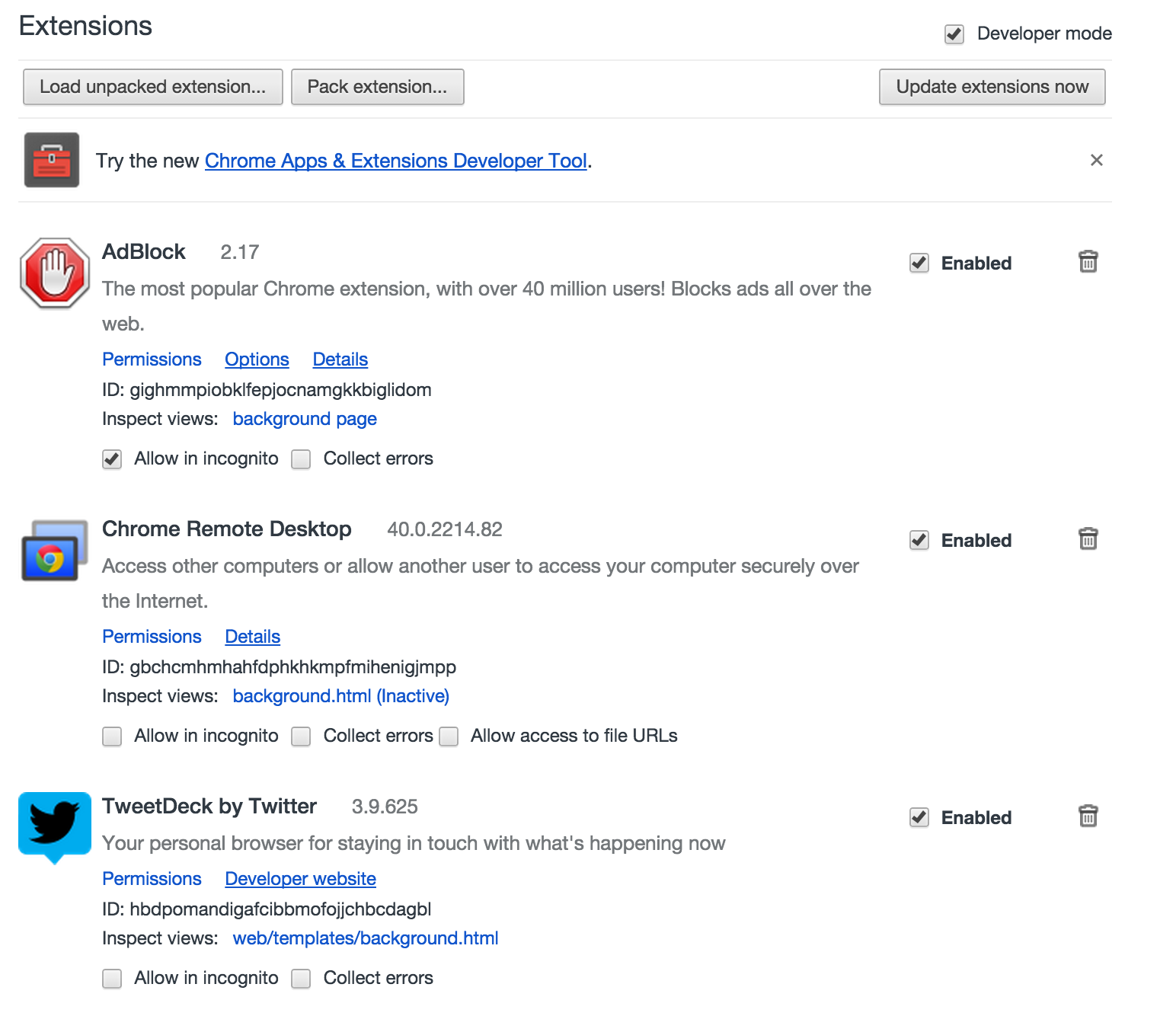
  • Chrome has been a dog lately. Opening Gmail has been like watching paint dry with that little blue progress bar seemingly stuck forever between just getting started and not quite done. I vaguely recall some advice a while back about extensions being the known culprit in one or two Chrome slow down cases so today I decided to go Nuclear and delete almost all of my installed extensions.

    The Last Extensions Left Standing
    The Last Extensions Left Standing

    Yes, I could have patiently disabled one at a time, closed Chrome, and relaunched Chrome until I found the bastard slowing me down but who has time for that? Instead, I removed all but the three extensions I actually use and just like that, Chrome+gmail was lighting fast again! Drive loads without me having to hit refresh multiple times and I’m able to click through the Google+ menu within seconds of opening it up in a new tab. It’s been like what a Windows computer used to feel like after an OS reformat. Good as new.

    I don’t think I’ll miss any of the extensions I deleted, but if I do, I’ll be adding them back in one at a time and seeing if Chrome goes the way of molasses again.

  • The Positive Web


    Since June we have been using the Securly web filtering solution. It is a truly cloud based solution with no on-premise equipment and very tight integration with Google Apps for Education. I’m told LDAP integration is coming soon but for us, that hasn’t been a deal breaker since most of our users are on Mac or ChromeOS. With IP based policies being rolled into the UI and a basically infinite ability to scale to meet our future bandwidth needs, Securly is a solution that continues to evolve right along with us.

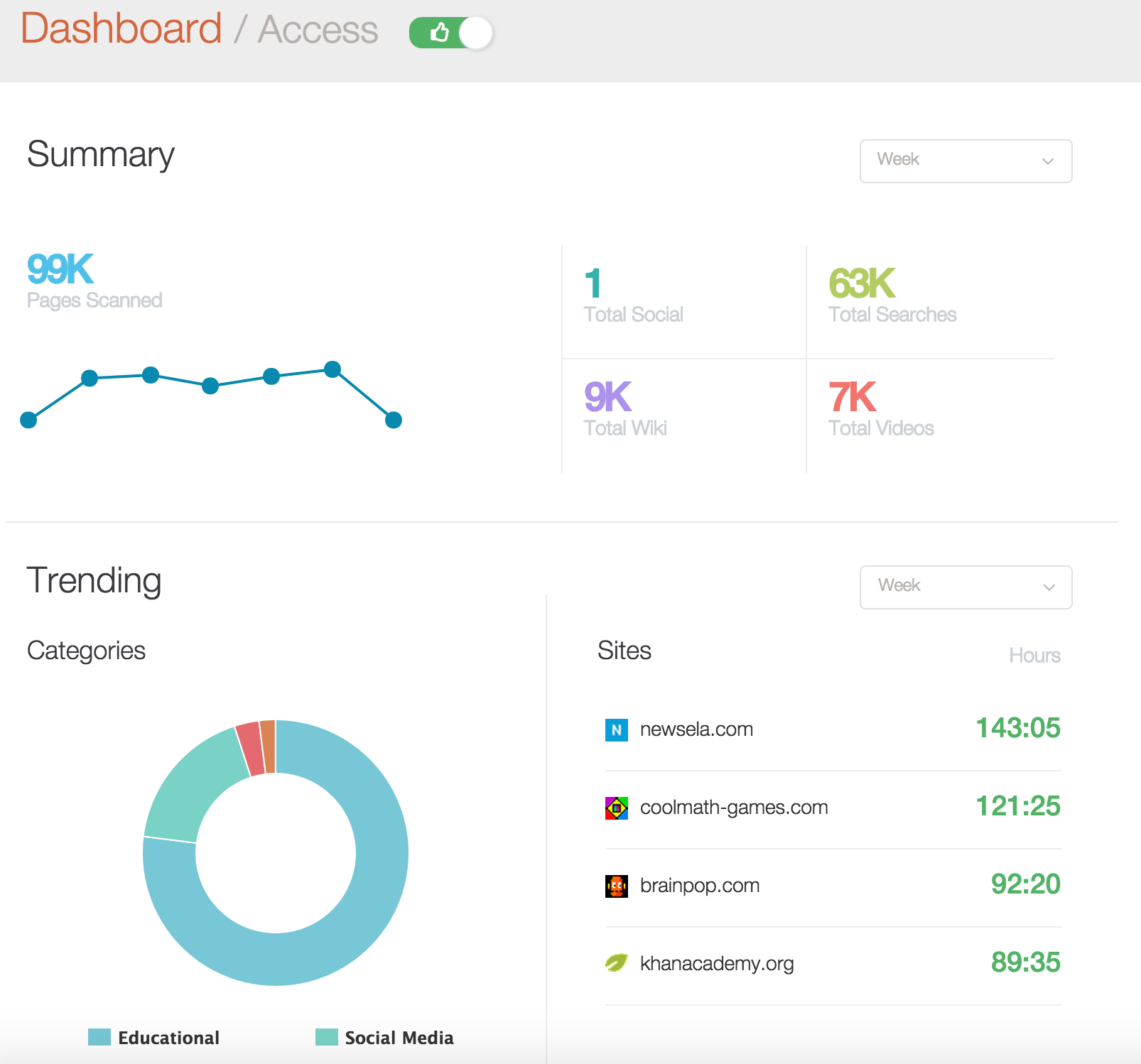
    In comparing Securly to the major web filtering players in the education space, I think it is fair to say that they have a different philosophy about web filtering than most. In the screen shot above, which I freaking love by the way, you can see stats for student web access. Not blocked pages, which they have a view for too, but sites kids are actually using. In our case, as we begin having discussions about wether Newsela is a service we want to pursue as a district standard, we now have compelling data telling us that it’s already being widely used and is in fact our most accessed web site on a weekly basis. The above dashboard is a very simple thumbs up view versus a thumbs down view of our district’s web activity but it goes to the heart of what Securly is about. Providing a web filtering solution for education. This is a relatively recent update to the UI (one that I hope finds it’s way over to the audit trail reports sooner rather than later).

    As I’ve said before, I have yet to meet a web filter that did everything I wanted it to do and did it easy. OpenDNS and Untangle still hold a sentimental place for me but Securly is fast becoming the easiest, most classroom friendly web filter I’ve ever used. Particularly in GAFEland. It’s not perfect*, but whenever we start discussing other options, we keep coming back to the simple administration, tight Google Apps integration and no on-prem box features that set Securly apart.

    I always looked down at web filtering as something that we had to do to be CIPA compliant in schools even if it hampered the learning process in classrooms. Lets be honest and admit that web filtering in the past was all about compliance and limitations and never worked well for the classroom teacher, no matter how hard we tried. With the rise of devices, web filters that over block and don’t allow for teacher judgement have become major impediments to learning. I always believed, and still firmly do, that educating kids (and teachers too) about proper internet etiquette, search and effective use of the web was more powerful than any filter could ever be, but thanks to Securly, I now see a positive use for the (mandatory) web filter that I never did before.

    Full disclosure. I’m a fan and Securly didn’t pay me to say so.

    *FYI – We can now set Force Login to Google Apps per IP Policy. Yay!